Labels

Categories: Food | Travel | Beer | Wine | Boston | Humor | TV | Tech | Pop Culture | Politics | Golf | Video | Photo | Auto
Sponsored: Samsung | Cadillac | Volt | GMC | AT&T | Gear List: Cameras, Lights, Microphones, etc.
More: SteveGarfield.com | Steve Garfield's Video Blog (archived 6/19/2013)
“As an Amazon Associate I earn from qualifying purchases.” | Mastodon
Showing posts with label Mac. Show all posts

Monday, March 16, 2020

Fix: Mac running out of disk space

I had a serious problem with my Mac running out of disk space. I wasn't adding anything, but I started getting warnings that my 'disk was running out of space.'


I downloaded DaisyDisk to help diagnose where the problem was. I found that in my 'Library > Application Support > AddressBook >' ONE CONTACT IMAGE keep being written in to the Sources directory.

I went into the contact nad changed the image, then the new image kept getting re-written to disk. Over and over again.

A Google search lead to to this fix, Fix: Mac is Running Slow due to AddressBookSourceSync.

I am implementing it now, and hope it solves my problem.

Posting it here in case someone has experienced the same thing.


Tuesday, November 19, 2019

I Made my 2020 Calendar on my Mac with Motif

Last year I used mimeo to create my 2019 calendar. It worked well.

This year I went to create my 2020 calendar, and after duplicating the 2019 calendar and renaming it 2020, I double-clicked it, and the app never loaded. I tried it a few times, then gave up.

I downloaded Motif from the Mac App Store and opened it through the CREATE menu on the Photo app.

It opened right up.

After dragging the photos that I wanted to use in my new calendar, it's simple to drag and drop photos on to each page.

Here's my cover:


On the month pages, you can choose to use up to 9 photos on each page in many different configurations, that are able to be modified. Lots of power here.

This is my December:


Here are some of the features you can use when creating your Motif calendar.

I like the feature that allows you to add a photo to an important date.

I'd like to be able to edit the text more to allow the background photo to show up more.


I had an overall great experience with Motif making my calendar for 2020.

Friday, January 08, 2016

What's the Best Webcam to Get for a Laptop Computer

I’d get the newer (2013) one below…

Logitech C920 has been the best and it has a tripod mount.

NEW
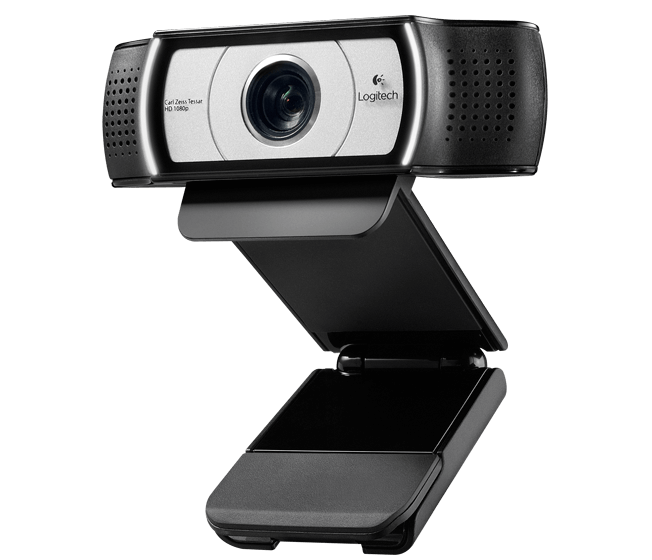
Looks like Logitech have a new one, the Pro Webcam: The Logitech Webcam C930e.


Here are the specs:

PRO WEBCAM
Ultra Wide Angle HD Webcam
For desktop video meetings, live feeds, webinars and more

LIST PRICE: $ 129.99
The Ultra Wide Angle webcam that brings pro-quality HD video and stereo audio to desktop video meetings.

• Full HD 1080p video calling (up to 1920 x 1080 pixels) 720p HD video calling (up to 1280 x 720 pixels) with supported clients
• 90 degree field of view
• H.264/SVC video compression
• Supports H.264 1080p for Skype® for Business, along with optimizations for best call performance in single or multiparty HD video.
• Zoom to 4X in 1080p
• Optional light application for control of pan, tilt and zoom
• ZEISS® lens certification
• Autofocus
• External privacy shutter
• Rightlight™ 2 Technology for clear image in various lighting environments, even low light
• Built-in dual stereo mics
• Automatic low-light correction
• Hi-Speed USB 2.0 certified (USB 3.0 ready)
• Tripod-ready universal clip fits laptops, LCD or CRT monitors

From Amazon.com, The Logitech Webcam C930e:

The latest technology for fluid full HD video calls
First 1080p HD webcam with on-camera video processing

Make a professional impression in vivid full HD video at up to a smooth 30 frames per second—without taxing your PC processing power. UVC H.264 encoding technology frees up bandwidth by putting video processing within the camera.

Easily focus in on details
Pan, tilt and zoom

With the ability to digitally pan, tilt and zoom, you can easily focus on visuals and presentations with the highest level of HD video detail. (To control experience, downloadable software application may be required.)

Extended 90-degree field of view
Widest-view business webcam

Now your video meetings can easily include whiteboard presentations or product demos. With an extended 90-degree field of view your clients and colleagues can clearly see you and whatever you’re presenting. And when the webcam is not in use, a convenient privacy screen covers the lens for added privacy and security.

Certified for Lync and Skype
Compatible with most video conferencing apps
Plug-and-play deployment

Enjoy easy USB connectivity to PCs or Macs and seamless compatibility with your familiar video apps—certified for Microsoft Lync 2013 and Skype, compatible with most UC and web conferencing applications, and supports H.264 1080p for Lync 2013.

Automatically adjusts for poor lighting
Autofocus. Auto light correction.

Smooth autofocus keeps your video image razor sharp, even in close ups. Logitech RightLight 2 technology automatically adjusts for low light or backlit situations so you’re always seen in just the right light.

Buy it at Amazon.com (affiliate link)


Logitech C930e 960-000971 USB 2.0 1920 x 1080 Video Webcam

Stay tuned for a hands on review. Here's PCMAG a review from 2013.

Saturday, May 18, 2013

iJustine Bought Vintage Macintosh Icon Art from Susan Kare


iJustine just got a HAPPY + UNHAPPY MAC poster from Susan Kare, designer of the original Mac icons. Cool.

Visit: Kare Prints.

Here's a print that I think is cool, Control Panel.

Monday, January 19, 2009

Mac to HD TV via DVI to HDMI to watch 24 on Hulu


Chris Brogan's tweet popped up on twhirl, on my HD TV, while I was watching 24 via hulu on my MacBook Pro connected via DVI to HDMI!

THIS is the future of internet connected TV's. It's not a siloed selection of the content chosen by TV manufacturers. It's the WHOLE thing! Having Chris' message pop up on my TV made me think of all the manufacturers at CES who were touting integration with internet applications. Things like Yahoo! widgets, Panasonic Viera Cast, and TiVo YouTube integration. It's all selected programming. That's not good enough for me.

Free an open internet access on a display, which just happens to be a TV, is the future.

The reason I connected my laptop to the TV is because my TiVo died and my episodes of 24 were gone. So that prompted me to look at where I could watch this past week's 24. It wasn't on Comcast's On Demand. It was on the Apple iTunes store for $2.99 each. It was on Hulu for free with 'limited commercial interruption.'

So we watched it on Hulu.

The commercials were short and we didn't mind watching them for the benefit of being able to see 24. With all the uproar of putting ads on online video, seeing these ads along with 24 wasn't invasive at all. In fact, watching 24, streamed from Hulu, on TV, made me forget I was watching video on the internet. I was just watching 24 on TV.

The days of crappy YouTube video are fading fast.

High quality streaming video is where it's at. This was an eye opening experience. At times there were buffering issues, but they didn't degrade the enjoyment of watching the video.