Off On A Tangent

Labels

Categories: Food | Travel | Beer | Wine | Boston | Humor | TV | Tech | Pop Culture | Politics | Golf | Video | Photo | Auto
Sponsored: Samsung | Cadillac | Volt | GMC | AT&T | Gear List: Cameras, Lights, Microphones, etc.
More: SteveGarfield.com | Steve Garfield's Video Blog (archived 6/19/2013)
“As an Amazon Associate I earn from qualifying purchases.” | Mastodon
Showing posts with label tv. Show all posts

Tuesday, March 16, 2021

How To Stream NBC on an Internet Only TV in your Cable TV Home


Let's say you have your main TV hooked up to Xfinity in your Great Room, but then you have a second TV in your bedroom that doesn't have a cable TV box, and you want to watch NBC TV shows like The Today Show on it. 

Here are three solutions to allow you to watch NBC broadcast TV on a TV where you've 'cut the cord'.

  • 1. Use an Antenna
If you within a good range of a broadcast antenna, you can hook up a fairly inexpensive antenna to your TV and watch live broadcast TV, just like they did back in the old days.

2. Link Your TV Provider to the NBC and NBCU Family of Apps

With this solution, you need to have an account with a cable provider like Xfinity.

"If you have an account with a participating cable/satellite/digital TV provider, you can link it to the NBC and NBCU family of apps to unlock all episodes in the library and access a live stream of your local station."

Once you connect your app to your cable TV provider, you can watch NBC shows with an NBC app. 

3. Use the Xfinity Stream App.

Just like the Xfinity Stream App on iOS, you can use the Xfinity Stream App on your supported smart TV, like the TCL Roku TV. 

This gives you access to the full range of channels that you are subscribed to on your main account, along with the cloud DVR service, if that's part of your package. 

Xfinity Stream App on Xfinity TV Partner Devices FAQs:

"We work with equipment manufacturers to bring the Xfinity Stream app to compatible Amazon Fire TV devices, LG Smart TVs, Roku devices and other Partner Devices. The Xfinity Stream app offers live broadcast channels, linear cable channels, cloud recordings and video on demand, all without having to rent an Xfinity TV Box from us.

The Xfinity Stream app for Partner Devices is currently offered in a "beta" version that doesn't include the full set of features and functionality that comes with the Xfinity Stream app or the web portal. Future releases of the app will include additional features and functionality, as well as improved stability and optimization. When using the "beta" app, you won't be charged an "additional outlet" service charge. Pricing may change in the future.

Please note that Xfinity X1 is the best way to watch Xfinity TV, and not all features of X1 are available if you choose to use a Partner Device. See below for more information."


Email ThisBlogThis!Share to XShare to FacebookShare to Pinterest
Posted by Steve Garfield at 8:21 AM
Labels: app, beta, cut the cord, internet, nbc, roku, tcl, tech, today show, tv, xfinnity

Sunday, December 27, 2020

Cutting the Cord 2021: How to Live Stream Local TV Stations

I'll be cutting the cord in 2021 and am researching How to Live Stream Local TV Stations on my Android TV.

My local stations are ABC, CBS, NBC, 7 News, NECN, and Fox 25. I'd also like HGTV. ;-)


Here are the options that I am considering and will update this post as I learn more about each option.

Note: This is a working document with changes and updates being made as I do more research and talk with some of the providers. Please look at the provider's site to see CURRENT plans and rules. I need to determine if I would be getting LOCAL news with each package too.

I will probably be getting an Internet package from Xfinity.

1. Digital Antenna

ABC, CBS, NBC, Fox.

2. YouTube TV $64.99/month

ABC, CBS, NBC, Fox, HGTV.

3. Hulu + Live TV $64.99/month

ABC, CBS, NBC, Fox, HGTV.

4. Tubi TV FREE

Fox local depending on where you live

5. Philo $30.00/month

HGTV

6. Sling $30/month

HGTV

7. Pluto TV Free

CBSN, CNN, NBC News Now, Sky News

8. Locast Free

ABC, CBS, NBC, 7 News, and Fox 25.

9. Xfinity Flex + Limited Basic/Choice 10+ TV $30/month 

ABC, CBS, NBC, 7 News, NECN, Fox 25, and PBS.

Restrictions apply. Not available in all areas. New residential customers only. Limited to Choice Limited TV. Equipment, installation, taxes and fees, Broadcast TV Fee (up to $19.45/mo.), Regional Sports Fee (up to $14.45/mo.) and other applicable charges extra. Pricing subject to change. Service limited to a single outlet. May not be combined with other offers. Limited Basic service subscription required to receive other levels of service. On Demand selections subject to charge indicated at time of purchase. Not all programming available in all areas. 30-Day Money-Back Guarantee applies to one month’s recurring service and standard installation charges up to $500. ©2021 Comcast. All rights reserved.

(Add 100 Mbps Internet - Total $54.99/month)

Limited time offer. Restrictions apply. Not available in all areas. New residential customers only. Limited to Choice Double Play. Offer requires enrollment in both automatic payments and paperless billing. Must enroll within 30 days of placing the order. Without enrollment, the monthly service charge automatically increases by $10. The automatic payment and paperless billing discount is for a period of 24 months and will appear on the bill within 30 days of enrolling. If either automatic payments or paperless billing are subsequently cancelled during the 24-month term, or services are reduced to Xfinity TV Limited Basic service only, the $10 monthly discount will be removed automatically. Kit offer for kit serviceable locations only. Limit one kit per customer. Equipment, installation, taxes and fees, Broadcast TV Fee (up to $19.45/mo.), Regional Sports Fee (up to $14.45/mo.) and other applicable charges extra, and subject to change during and after the promo. After promo, or if any service is cancelled or downgraded, regular rates apply. Comcast's monthly service charge for Choice Double Play is $89.99 and for upgrading from Performance Internet to Performance Pro Internet service is $15.00 more per month (subject to change). Service limited to a single outlet. May not be combined with other offers. TV: Limited Basic service subscription required to receive other levels of service. On Demand selections subject to charge indicated at time of purchase. Not all programming available in all areas. Internet: Actual speeds vary and are not guaranteed. For factors affecting speed visit www.xfinity.com/networkmanagement. 30-Day Money-Back Guarantee applies to one month’s recurring service and standard installation charges up to $500. ©2021 Comcast. All rights reserved.

10. Xfinity Flex + Preferred 220+ TV  $69/month

ABC, CBS, NBC, 7 News, NECN, Fox 25, HGTV, and PBS.

Limited time offer. Restrictions apply. Not available in all areas. New residential customers only. Limited to Digital Preferred. Offer requires enrollment in both automatic payments and paperless billing. Must enroll within 30 days of placing the order. Without enrollment, the monthly service charge automatically increases by $10. The automatic payment and paperless billing discount is for a period of 24 months and will appear on the bill within 30 days of enrolling. If either automatic payments or paperless billing are subsequently cancelled during the 24-month term, or services are reduced to Xfinity TV Limited Basic service only, the $10 monthly discount will be removed automatically. Kit offer for kit serviceable locations only. Limit one kit per customer. Equipment, installation, taxes and fees, Broadcast TV Fee (up to $19.45/mo.), Regional Sports Fee (up to $14.45/mo.) and other applicable charges extra, and subject to change during and after the promo. After promo, or if any service is cancelled or downgraded, regular rates apply. Comcast's monthly service charge for Digital Preferred, ranges based on area, from $76.70 to $85.20 (subject to change). Service limited to a single outlet. May not be combined with other offers. Limited Basic service subscription required to receive other levels of service. On Demand selections subject to charge indicated at time of purchase. Not all programming available in all areas. 30-Day Money-Back Guarantee applies to one month’s recurring service and standard installation charges up to $500. ©2021 Comcast. All rights reserved.

Additionally, I am researching the iOS news apps for the local stations. 


11. Don't Cut the Cord:

Xfinity Flex + Select + 205 + TV + Internet up to 300 Mbps $89.99/month

ABC, CBS, NBC, 7 News, NECN, Fox 25, HGTV, and PBS. Plus more including AMC, BBC America, BBC World News, Bravo, CNN, CNBC, ESPN, Food, NESN, SYFY, and lots more cable channels...


Requires xFi Gateway

Available for $14/mo at checkout.

  • A modem + router in one that delivers our best home WiFi experience, xFi
  • Reliably fast speeds, consistent coverage, 24/7 tech support
  • FREE Advanced Security helps protect connected devices from online threats

First TV Box

$7.5/mo

TV Box Icon

Additional TV Box

$7.5/mo

DVR Icon

Cloud DVR Service

Included when you get an X1 TV Box

Limited time offer. Restrictions apply. Not available in all areas. New residential customers only. Limited to Select+. Offer requires enrollment in both automatic payments and paperless billing. Must enroll within 30 days of placing the order. Without enrollment, the monthly service charge automatically increases by $10. The automatic payment and paperless billing discount is for a period of 24 months and will appear on the bill within 30 days of enrolling. If either automatic payments or paperless billing are subsequently cancelled during the 24-month term, or services are reduced to Xfinity TV Limited Basic service only, the $10 monthly discount will be removed automatically. 2-year minimum term agreement required. Early termination fee applies if all Xfinity services are cancelled during the agreement term. Kit offer for kit serviceable locations only. Limit one kit per customer. Equipment, installation, taxes and fees, Broadcast TV Fee (up to $19.45/mo.), Regional Sports Fee (up to $14.45/mo.) and other applicable charges extra, and subject to change during and after the term agreement. After first 12 months, monthly service charge for Select+ increases to $109.99 per month for months 13-24. After term agreement, or if any service is cancelled or downgraded, regular rates apply (subject to change). Service limited to a single outlet. May not be combined with other offers. TV: Limited Basic service subscription required to receive other levels of service. On Demand selections subject to charge indicated at time of purchase. Not all programming available in all areas. Internet: Actual speeds vary and are not guaranteed. For factors affecting speed visit www.xfinity.com/networkmanagement. 30-Day Money-Back Guarantee applies to one month’s recurring service and standard installation charges up to $500. ©2021 Comcast. All rights reserved.


89.99

14.00

7.50

7.50

------

118.99

=====

Equipment, installation, taxes and fees, Broadcast TV Fee (up to $19.45/mo.), Regional Sports Fee (up to $14.45/mo.) and other applicable charges extra, and subject to change during and after the term agreement.

12. Fubo.tv $64.99/month

ABC, CBS, NBC, FOX 25, HGTV, and PBS.

Email ThisBlogThis!Share to XShare to FacebookShare to Pinterest
Posted by Steve Garfield at 9:07 AM
Labels: cable, cutting the cord, hulu, local, locast, news, philo, pluto, sling, tech, tubi, tv, xfinity, youtube tv

Saturday, February 15, 2020

Review: SONY A9G MASTER Series LED 4K High Dynamic Range (HDR) Smart TV (Android TV)

Review: SONY A9G MASTER Series LED 4K High Dynamic Range (HDR) Smart TV (Android TV)

The vibrance of the colors on this TV are incredible. Now that I have an OLED SONY TV, I see why everyone was telling me that OLED is the only way to go. We are enjoying 4K shows on streaming services, and re-watching some favorites.


OLED
"Powered by the Picture Processor X1™ Ultimate, this OLED TV pairs the deep black and natural color of OLED with Pixel Contrast Booster™ for enhanced color contrast in high luminance. Everything you watch comes to life with fine detail and vivid color."

NETFLIX
"Enjoy studio quality with Netflix Calibrated Mode
This mode was specially developed to enjoy Netflix originals and reproduce the same picture quality on a TV as on a studio evaluation master. With Netflix Calibrated Mode, the creator's vision and intent is faithfully preserved."

AMAZON PRIME VIDEO
Amazon Prime. We enjoy these shows: Modern Love, Late Night, The Marvelous Mrs. Maisel, Jack Ryan, The Big Sick, Hanna, and Humans.

ANDROID TV
Connecting to streaming providers is easy. Gives me a taste of the freedom of cutting the cord, although I'm also experiencing the stuttering videos of high latency, which is a problem that you don't have with cable tv.

Stuttering
I've seen stuttering with Star Trek Picard on CBS All Access. When I talked to customer support they told me that it was a latency problem that they sometimes have. The support rep said that Netflix and Amazon Prime Video don't have the same problem because they connect directly to your tv with an enhanced technology that CBS All Access has yet to invest in. I don't understand what he was referring to. He told me, "That's why CBS All Access is cheaper." LOL. I'm not sure what's going on here but would love to learn exactly what he was referring to.

Note: On Friday morning, the day after the Star Trek Picard release, the show was fine. No streaming issues. I am upgrading my internet modem and will keep an eye on this.

Upgrade: Xfinity xFi Gateway 3rd Generation

I upgraded the modem to the newest Xfinity xFi Gateway 3rd Generation XB7-T.

Specs:
Model Numbers: CGM4331COM
Friendly Model Name: XB7
Gigabit Ethernet Ports: 4
Dual-Band WiFi Option: Yes
Maximum Data Throughput: 2.5 Gbps
WPS (WiFi Protected Setup): Yes
Gateway/ Network Management Tool (http://10.0.0.1): Yes
Xfinity xFi Eligible: Yes
Two Total Telephone Ports: Yes (separate Alarm Port)
Link Cordless Phones (CAT-iq 2.0*): Yes
Home Hotspot Capable: Yes
Compatible with Xfinity Home: Yes

I also turned on the new modem's Wi-Fi. At the same time I removed the Orbi Mesh WiFi network, and turned off Bridge Mode, which I was using to allow my Orbi Mesh Network to run the Wi-Fi in the house. I wanted to rule out any variables when trying to trouble shoot my issues.

After a call to SONY support, I fixed both the Hulu no sound issue, and the CBS All Access and Disney+ stuttering video issues. For the audio issue, I went into the SONY audio settings and turned OFF Bravia Sync, and turned ON PCM.

SONY SONOS AUDIO SETTINGS FOR HULU
Image: Audio System Prioritization = OFF

SONY SONOS AUDIO SETTINGS FOR HULU
Image: Digital Audio Out = PCM

NETWORKING
I took the MAC address of the SONY TV and put it into the Xfinity Router as a fixed address instead of allowing DCHP to assign an address.

REBOOT
I also did a SOFT REBOOT of the SONY TV by holding down the power button on the SONY remote for 10 seconds.

I also used the Xfinity XFi app to reboot the Xfinity modem.

UPDATE
I had the 'no sound' and 'stuttering' happen again, even after adding in orbi mesh wifi to increse the wifi speed in the room.

I rebooted the orbi, and then unplugged and re-plugged in the tv. That fixed everything. So, the SOFT REBOOT above might have actually been the final fix the last time this happened.

SONY and SONOS
I've got a Sonos sound system, PlayBar and Sub. It supports all the latest technology including Dolby sound. It sounds great, until it doesn't sound at all. Hulu and Disney+ have gone silent at times. Hulu support had me turn off Dolby sound, and nothing happened, until I tried it again the next morning and it worked. It's a mystery. Solved for now. If I had to guess, I'd say that Amazon Prime Video and Netflix have superior apps.

AMAZON ECHO
You can control the tv with your Amazon Echo device. You can also, add the Amazon Echo app to allow you access to your ring devices and say things like, "Alexa, Show me my front door on the Den TV." FAQ - Control your Android TV with Amazon Alexa-enabled Devices.


XFINITY
Comcast Xfinity provides both cable tv and internet service used by this tv. In an environment of cord cutting, where this tv supports sampling streaming TV shows, I can see the appeal of steaming via the smart tv, but what you lose is one central place to get help for anything that doesn't work. Also, Comcast Xfinity has been broadcasting live tv and cable for years and years, and you never have issues with connectivity or stuttering. Some reasons to think twice before cutting the cord.

SPEED TESTS
Here are updated speed tests for different locations around the house. Prior testing was done with eero and orbi mesh WiFi devices. This test uses just the Xfinity xFi 3rd Generation Gateway, with one ring WiFi extender on the front porch.

SPEED TESTS:

OFFICE
BEFORE(Wired Base eero) 230 Mbps
AFTER (Wired Base orbi) 230 Mbps

UPDATE (Xfinity xFi Gateway 3rd Generation) WiFi 120/130/310 Mbps
UPDATE (Xfinity xFi Gateway 3rd Generation) Wired 1 GB Port 950 Mbps


Image: Fast.com Internet Speed Test 1.8 Gbps

LIVINGROOM
AFTER (Wired Satellite eero) 220 Mbps
AFTER (WiFi Satellite orbi) 210 Mbps

UPDATE (Xfinity xFi Gateway 3rd Generation) 120 Mbps

KITCHEN
BEFORE (WiFi Satellite eero) 110 Mbps
AFTER (WiFi Satellite orbi) 210 Mbps

UPDATE (Xfinity xFi Gateway 3rd Generation) 100/110 Mbps

DEN
BEFORE (WiFi Satellite eero) 59 Mbps
AFTER (WiFi Satellite orbi) 210 Mbps

UPDATE (Xfinity xFi Gateway 3rd Generation) 100 Mbps

Note: You need a minimum of 25 mbps to stream Ultra HD on Netflix.

FRONT DOOR
BEFORE 45 Mbps
AFTER 220 Mbps

UPDATE (Xfinity xFi Gateway 3rd Generation) 23 Mbps

SALES AND HOME INSTALLATION
My nephew, Independent Security Systems, Inc, installed this tv along with a Sonos sound system. He can do the same for you, if you are in the greater Boston area.
Email ThisBlogThis!Share to XShare to FacebookShare to Pinterest
Posted by Steve Garfield at 9:38 AM
Labels: A9G, OLED, Sony, tech, tv

Sunday, January 12, 2020

How To: Adding Disney+ to a TV with Android TV OS

Adding Disney+ to a TV with Android TV OS is easy if you’ve already got the Disney+ App on a smartphone. One click does it.


Image: Use Mobile Device


Image: Use Mobile Device Close Up


Image: Allow


Image: Disney+
Email ThisBlogThis!Share to XShare to FacebookShare to Pinterest
Posted by Steve Garfield at 8:44 PM
Labels: Disney+, tech, tv

Tuesday, January 07, 2020

How To Upgrade Netflix from HD to UHD when subscribed through Comcast Xfinity

Comcast Xfinity has a fairly new package that includes a Netflix subscription. This means that instead of paying Netflix for a monthly subscription, the cost is included in your Comcast Xfinity package, and billed through Comcast Xfinity.

If you want to upgrade your subscription from HD to UHD (4K), you'll get a message on the Comcast Xfinity page to give them a call to change your package.


Don't do that.

Instead, sign into your Netflix account on the Netflix website, and upgrade there. You'll be charged through your Comcast Xfinity billing process.

Email ThisBlogThis!Share to XShare to FacebookShare to Pinterest
Posted by Steve Garfield at 5:32 PM
Labels: 4k, comcast, hd, netflix, tech, tv, uhd, xfininty

Sunday, December 29, 2019

How To: Getting Netflix, Amazon Prime Video, Hulu, Disney+, YouTube and CBS All Access on Sony Android TV

I'm planning for the imminent installation of my SONY A9G Master SERIES OLED 4K ULTRA HD HDR 65” TV.

Here's how to get Netflix, Amazon Prime Video, Hulu, Disney+, YouTube and CBS All Access through the Android TV apps on the TV. HBO and Starz will be through Comcast Xfinity, and Apple TV+ will be through my Apple TV box.

Over time the majority of these apps will be available via the Comcast Xfinity X1 box, and not require separate apps.


NETFLIX
Some of the Netflix ready devices include a NETFLIX button on the supplied remote that can be used to launch the app. If the remote for your Netflix ready device doesn't include a NETFLIX button, the app can be accessed by pressing the HOME button, and then navigating to the Netflix app. I am subscribing to Netflix through a Comcast Xfinity package.

AMAZON PRIME VIDEO
The Android TV™ supports 4K streaming of the Amazon® Instant Video app. To enjoy 4K streaming of the Amazon Instant Video app, download and install the latest software update for the Android TV. Amazon Prime Video is included with Amazon Prime.

HULU
There is one Hulu app on all of our Android TVs. The service you receive will depend on your Hulu subscription plan. I am paying for Hulu without commercial.

Disney+
The Disney+ Android app can be installed from Google Play™ Store or Sony Select on your Android TV. I bought a three year subscription to Disney+.

YouTube
You can play 4K movies on the YouTube® app with a compatible Android TV™. Free.

CBS ALL ACCESS
If you own an Android TV you can use the official CBS All Access app from the Google Play Store. I will be subscribing through the CBS All Access app.

COMCAST Xfinity Box
- HBO
- STARZ

Note: To make things easier, bundled in with the Comcast Xfinity interface, you can also get these streaming services via the X1 box:
- Netflix
- Amazon Prime Video
- YouTube

Coming Soon:
- Hulu
- CBS All Access

APPLE TV Box
- Apple TV+

More:
Setup and Troubleshooting Video Streaming Services
This page provides common Setup and Troubleshooting information for Netflix, Amazon Prime Video, Hulu, Disney+, and YouTube.

Email ThisBlogThis!Share to XShare to FacebookShare to Pinterest
Posted by Steve Garfield at 11:48 AM
Labels: A9G, Amazon Prime Video, Android TV, Apple TV, Apple TV+, CBS All Access, comcast, Disney+, HBO, hulu, netflix, Sony, STARZ, tech, tv, xfinity, youtube

Friday, May 19, 2017

XFINITY TV anywhere in your home via WiFi

Xi5-P allows you to put XFINITY TV anywhere in your home via WiFi, without a a cable connection. Powered by USB-C and connects to TV via HDMI. Supports High Dynamic Range (HDR), but not 4K/UltraHD, that will come in a future device.

Requirements: "To have a Wireless TV box in your home, you'll need XFINITY TV service, at least one additional X1 TV box to act as the primary X1 device on your account and XFINITY Internet with a Wireless Gateway 3 (with RDK-B firmware) to stream video over the Xi5's WiFi connection."

Update: This mini box currently has a $9.95 monthly charge.

Xi5 TV Box FAQ

Email ThisBlogThis!Share to XShare to FacebookShare to Pinterest
Posted by Steve Garfield at 6:36 AM
Labels: comcast, tech, tv, xfinity

Wednesday, July 15, 2015

Campy Man from U.N.C.L.E. opens in the UK and US on August 14, 2015.

The Man from U.N.C.L.E. movie used exposition to set up the plot where two no-name agents from the US and Russian band together to defeat somewhat Nazi allied villains who want to rule the world with the threat of atomic weapons.

Wonder how this will be. #ManFromUNCLE #movies pic.twitter.com/MT3uqxMil2

— Rachel Aubuchon (@iced782mocha) July 2, 2015


Fans of the Man from U.N.C.L.E. TV show know the agents as Napoleon Solo and Illya Kuryakin, but younger audiences attending this movie will have to wait a while to figure out the character’s names, especially when Napoleon Solo keeps calling Ilya, Pasha. At least that’s what I heard.


Henry Cavill as Napoleon Solo and Armie Hammer as Illya Kuryakin had great chemistry. When I saw Jared Harris, I thought, hey, that’s the English guy from Mad Men!

One upsetting part of the movie for me was when they used a photo album to show the atrocities that the former Nazi doctor did to Jewish concentration camp victims. That part went on way too long. We get it. The doctor was a bad man.

After the movie was over, I tried to describe it as a less serious Mission Impossible, or Matt Damon Movie, but then narrowed in on calling it campy.

It lived in between being serious and humorous.

At the end, there was a set up to make more. Let’s see if audiences want it.

Watch the original TV series here:

Email ThisBlogThis!Share to XShare to FacebookShare to Pinterest
Posted by Steve Garfield at 11:05 PM
Labels: manfromuncle, movie, tv

Saturday, December 20, 2014

How to Fix: Comcast Xfinity TV Go Video Loading Adobe Flash Problem

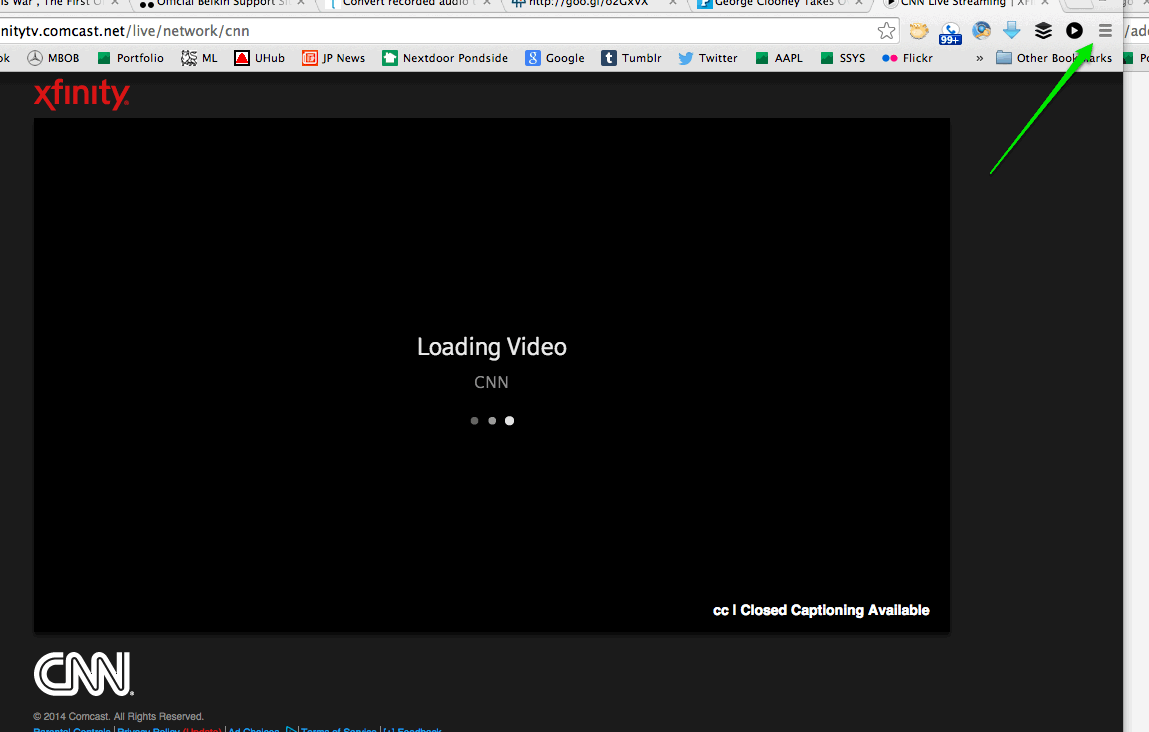
It's cool that you can watch live video via Xfinity TV Go, but sometimes the videos don't play, and you're stuck on a VIDEO LOADING page.

You might have brought this on yourself by changing a setting in Google Chrome that keeps videos from automatically playing.

You thought it was a good idea at the time, because it sped up the browser, but then when you wanted to watch some live video, you had NO IDEA how to make it work.

I went over to the ADOBE web site, looked around at a message board where a lot of people were complaining, some even saying to DELETE Chrome and reinstall.

Well, sometimes that works, and in this case it probably would, by resetting all the settings, but I figured out how to get videos to play again on Xfinity TV Go, but just changing one setting in my browser settings...

Hope this can work for you.

Here's how I did it.

Here you are seeing 'LOADING VIDEO...'


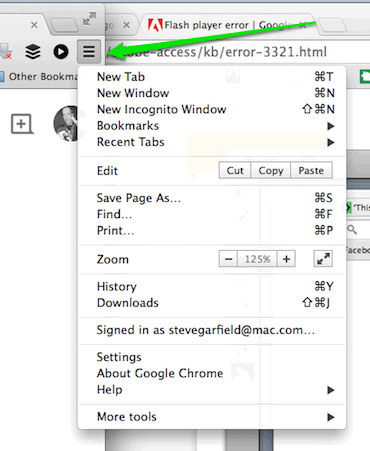
CLICK THE 'TOP RIGHT MENU ICON'
SELECT 'SETTINGS'


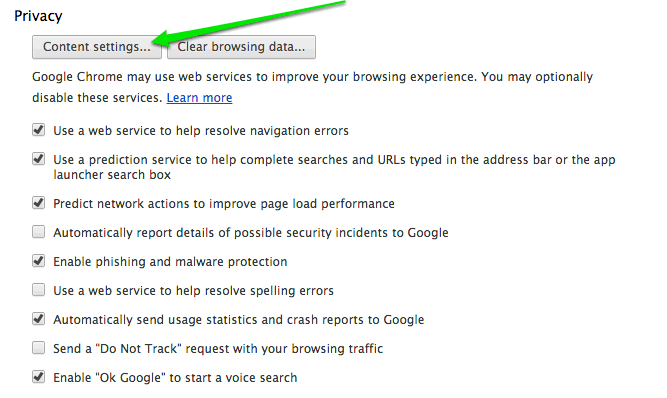
UNDER PRIVACY
CLICK 'CONTENT SETTINGS'


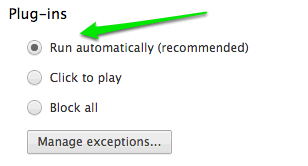
UNDER PLUGINS
CLICK 'RUN AUTOMATICALLY'


Email ThisBlogThis!Share to XShare to FacebookShare to Pinterest
Posted by Steve Garfield at 9:31 AM
Labels: adobe, comcast, flash, go, tech, tv, xfinity

Saturday, December 06, 2014

Teaching my Mom the difference between HDMI1, HDMI2, and TV so she can get Netflix on the Amazon fireTV stick

I got my mom (89) an Amazon Fire TV Stick to allow her to watch Nextflix on her TV.


Installing the fireTV stick was easy, teaching her the the difference between HDMI1, HDMI2, and TV was hard!

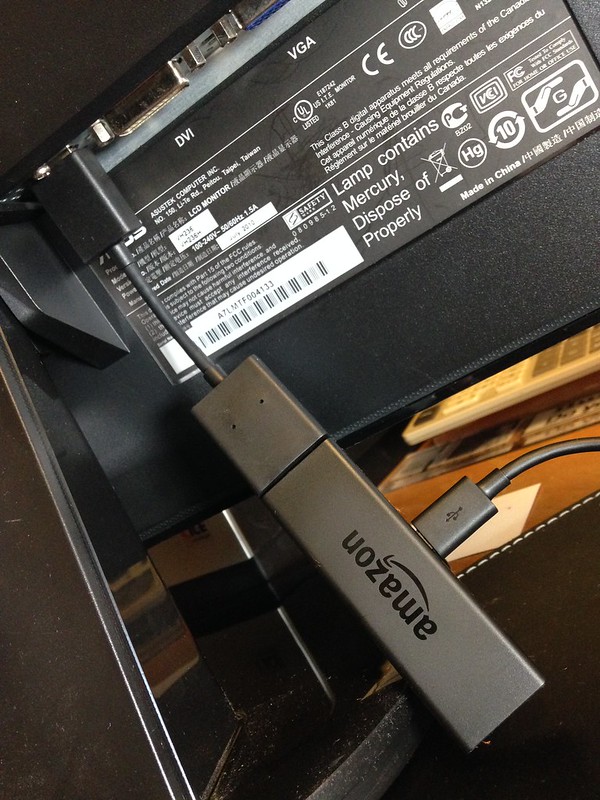
Amazon fireTV stick connected via HDMI EXTENDER CABLE TO Monitor HDMI port

HDMI1 and HDMI2
Once I had the firstTV stick set up, it was time to teach my mom how to use it to access Netflix.

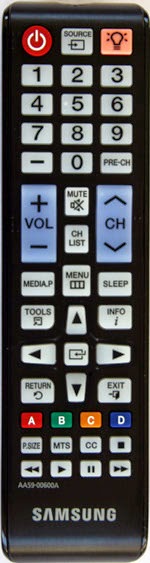
My mom has Xfinity and uses that remote to do everything. But now that I introduced a new input, I had to go find the remote that came with the TV to show her how to switch between Xfinity and the Amazon fireTV smart stick, which from here on out I'll call Netflix.

So I found the remote and showed her the SOURCE button.

Note: Maybe she oculd have used the Xfinity remote to do this. I'll have to take a look the next time I visit. Makes sense.


Me: Here mom. Use this remote to change between HDMI1 and HDMI2. HDMI1 is your TV, and HDMI2 is Netflix.

Mom: What does HDMI mean?

Me: I don't know, just press the SOURCE button.

Mom: What's HDMI1 and HDMI2?

Me: HDMI1 is your TV, and HDMI2 is Netflix.

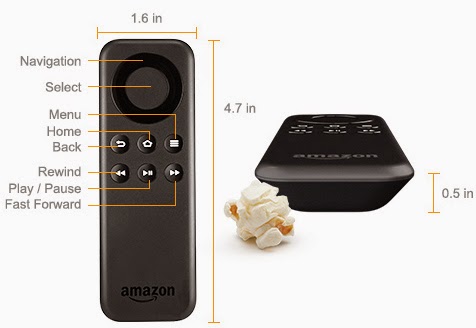
AMAZON FIRETV STICK REMOTE
So we get Amazon fireTV stick display up on the tv and now need to navigate around.


Me: Use the circle to go up, down, left, right, and the button inside the circle to select. Try moving around.

Mom: OK.

When my mom pressed down, it moved down two locations instead of one, and sometimes she pressed the select button instead of navigation. We figured out that the black circle was not differentiated enough in color to distinguish it from the black selection button.

We figured that out.

NETFLIX
Then we moved on to selecting Netflix.

Black Mirror
Netflix on Amazon fireTV stick

Once there we looked at how to select and watch a show.

Back to TV

After that we practiced going back to TV.

[Times Passes and we visit again]

Mom: My TV isn't working. It says No Signal. I watched Netflix on my computer at my desk.

So I went over to the TV and saw that the SOURCE was set to TV. Ah ha!

Me: Mom, when you press the SOURCE button, you don't go to TV to get TV, you go to HDMI1 to get TV, which is Xfinity. When you press the SOURCE button, you need to bypass the TV option and only go to either HDMI1 or HDMI2. No TV.

That cleared things up!
Email ThisBlogThis!Share to XShare to FacebookShare to Pinterest
Posted by Steve Garfield at 12:42 PM
Labels: amazon, netflix, stick, tech, tiretv, tv

Wednesday, March 05, 2014

Stream Live TV to a Web Browser via Comcast Xfinity X1 over your Home Network

I've always wanted to be able to stream Live TV to a web browser when in my office at home.

Up until recently, my solution was Aereo TV.

Now Comcast Xfinity has come out with a new solution that lets you Stream Live TV to a Web Browser via Comcast Xfinity X1 over your Home Network.

Visit this page, Xfinity TV on X1 Platform to take a look at the TV Grid.

Then you can stream anything on your browser. Streaming also works with the Xfinity TV App.


Guide


Clicking on a program to watch or record


Watching my local CBS affiliate news, live.


Great quality.


Another view of how great the quality is.


One bonus of the Xfinity TV app is that you can download any recordings from the X1 DVR and save them TO GO on your device.

Email ThisBlogThis!Share to XShare to FacebookShare to Pinterest
Posted by Steve Garfield at 11:47 AM
Labels: tech, tv

Thursday, September 26, 2013

Jimmy Fallon Makes Video Sing for TV and the web

Jimmy Fallon and his team are doing a great job of building multipurpose video content, which is designed with many uses in mind.

They then use social media to share with their fans.

It gets people who don't stay up late enough to watch the show, to see the best bits.

Also, the videos that they post are short, so you don't have to commit a lot of time to watching.

YouTube
Jimmy Fallon is smart to use YouTube to share, even on the Late Night with Jimmy Fallon NBC site

They are video blogging, or vlogging as the kids say.

Young Jimmy Fallon & Justin Timberlake Sing At Camp Winnipesaukee

Young Jimmy Fallon & Justin Timberlake Sing At Camp Winnipesaukee - Show Guests - Late Night with Jimmy Fallon

Video on a blog post.

Young Jimmy Fallon & Justin Timberlake Sing At Camp Winnipesaukee currently has 715K views on YouTube.

Go to the Late Night YouTube page and you'll clearly see that the content was created for the show with YouTube distribution in mind.

The easiest way to see this is to look at the playlists that they have put together:

latenight - YouTube playlists

PLAYLISTS
Justin Timberweek. Videos with Justin Timberlake.
Thank You Notes
Late Night Hashtags
Music on Late Night
Ask Jimmy - Web special answering fan questions
Night News Now
Web Exclusives

Playlists are a great way to highlight themed content on YouTube. [Tweet This!]

The other thing they do is create special cover version of songs with the artist.
Call Me Maybe - 15 Million Views
Blurred Lines - 11 Million Views
All I want For Christmas - 10 Million Views

Facebook
Embedded YouTube video on Late Night with Jimmy Fallon on Facebook. This makes it easy for people to like and share.

Young Jimmy Fallon & Justin Timberlake Sing At Camp Winnipesaukee content on Facebook:
Justin Timberlake and Jimmy are back at summer... - Late Night with Jimmy Fallon

7,401 LIKES, 1,290 shares and 285 comments.

Sharing on Social Media
They are sharing on twitter [445,233 followers], facebook [660,157 likes], and tumblr [I don't see a counter].

Bonus for reading this far
Here they go again, Jimmy Fallon, Sesame Street & The Roots Sing "Sesame Street":


Jimmy Fallon and his producer Gavin Purcell are in my book, Get Seen:


Get Seen: Online Video Secrets to Building Your Business (New Rules Social Media Series)

Look inside:
Get Seen: Online Video Secrets to Building Your Business (New Rules Social Media Series): Steve Garfield, David Meerman Scott: 9780470525463: Amazon.com: Books

Email ThisBlogThis!Share to XShare to FacebookShare to Pinterest
Posted by Steve Garfield at 7:11 AM
Labels: popculture, social media, tv

Friday, June 21, 2013

Gaming with My Mom - Show Clips - Late Night with Jimmy Fallon

Gaming with My Mom - Show Clips - Late Night with Jimmy Fallon
Gaming with My Mom - Show Clips - Late Night with Jimmy Fallon, a photo by stevegarfield on Flickr.

Jimmy Fallon asked viewers to take video of themselves playing video games with their moms. I did it and my mom and I made it on tv for 2 seconds. I love America.


Video: Gaming with My Mom - Show Clips - Late Night with Jimmy Fallon

Here's all the video I shot.
Email ThisBlogThis!Share to XShare to FacebookShare to Pinterest
Posted by Steve Garfield at 3:48 AM
Labels: game, jimmyfallon, late night with jimmy fallon, latenightwithjimmyfallon, popculture, tv, video

Thursday, June 13, 2013

[Video] Jimmy Fallon brings back Tebowie with Rebel, Rebel on Late Night With Jimmy Fallon

Tim Tebow traded from the NY Jets to New England Patriots.

That calls for Jimmy Fallon to bring back Tebowie singing Rebel, Rebel on Late Night With Jimmy Fallon.

Would have aired on June 12, 2013, but the Bruins/Chicago Stanley Cup Game went long.


More videos here.

Beer Me!

Late Night with Jimmy Fallon Beer Me Pint Glass

Love this glass.


Image: Jimmy Fallon as Tebowie. Courtesy Late Night With Jimmy Fallon
Email ThisBlogThis!Share to XShare to FacebookShare to Pinterest
Posted by Steve Garfield at 7:14 AM
Labels: humor, jimmy fallon, late night with jimmy fallon, tebowie, tim tebow, tv

Sunday, May 26, 2013

Live Broadcast TV Streaming to my iPad with AereoTV


Catching the weather report on @7news, on iPad, via @aereotv #kitchen #tv
Email ThisBlogThis!Share to XShare to FacebookShare to Pinterest
Posted by Steve Garfield at 12:41 PM
Labels: boston, tv

Saturday, May 25, 2013

Testing Aereo Boston: Live Broadcast TV Streaming Online to My Computer

I pre-registered for Aereo, so I've got exclusive access to Aereo before it becomes available to the general public in Boston.

Aeroe: Live TV Online
Image: Aereo: Live TV Online

Aereo allows you to stream live TV to your computer.

This is something I've wanted for a while. You know when breaking news happens and twitter starts being filled with live reports? Many times, the best place to see what it happening is on live TV.

That means stepping away from the computer, and moving to a TV. It's a first world problem for sure.

But Aereo seems like it could be a solution for people without subscriptions to cable TV, or those that want to use their computer as a TV replacement. Existing solutions require the purchase of add on hardware tuners.

So here we go. Let's see what Aereo looks like.

SIGN UP
You have to sign up with a valid credit card which has a Boston billing address. That's straight forward.

Once signed up, the Aereo home screen shows up.

Aereo: Home Screen
Image: Aereo: Home Screen

RECORDING
Oh look, it's SMASH! One of my favorite shows. I'll be sad to see it go. That's onw of the featured shows, and oh look, you can record it like a TiVo.

Let's try that.

Aereo: RECORD a SHOW
Image: Aereo: RECORD a SHOW

My options are to Record:

- Jut this oncee
- Every New Episode
- All Episodes
- Cancel

Optionally, I can share to twitter.

Since this is the last episode ever, I'll choose Just this once, and I'll share to twitter.

Oh look, recording options.

Aereo: RECORDING OPTIONS
Image: Aereo: RECORDING OPTIONS

Very nice. I'll just click SAVE.

Cool. Now it shows up as a scheduled recording.
Aereo: RECORDINGS
Image: Aereo: RECORDINGS

I have a total of 20 hours of recording space at the $8/month subscription rate.

WATCHING LIVE
Now let's get back to watching live TV.

Let's watch that show about BBQ.

Aereo: WATCH
Image: Aereo: WATCH

OK, I'm watching Live.

Aereo: Watching LIVE Buffering...

No wait.

I'm watching Buffering... live.

This isn't so good.

Let's see if it clears up.

Aereo: More buffering
Image: Aereo: More buffering

Mmmm...

Aereo: And more buffering
Image: Aereo: And more buffering

Coffee-crusted pork tenderloins! Sounds good, but the buffering makes this unwatchable.

Let me check the Support FAQ to see what's happening. Maybe it's getting slammed buy everyone from Boston trying it at the same time.

Here's my SpeedTest results:


Should have no bandwidth problems.

Let's try another channel.

How about Track and Field?

Aereo:Track and Field
Image: Aereo: Track and Field

OK, now that's better. No buffering. HIGH quality and great sound.

Let's watch for a while.

No buffering now. This is working very well.

Now I'm watching I SPY on Retro TV. Hey, it's secret agent Bill Cosby!

Aereo: I SPY
Image: Aereo: I SPY

I didn't even know there was such a thing as Retro TV. ;-) Tonight on Retro TV, The Saint and Route 66. Nice.

Despite the initial buffering problems, everything is running smoothly now.

Do you have Aereo? What's your experience?

Update:

I'm back.

Golf is buffering.

Aereo: Golf Buffering

Update II:

I'm back.

Golf isn't buffering.

Aereo: Golf

Update III:

I'm back again.

I'm watching Martin and Lewis on #TheColgateComedyHour from the 1950's on @aereotv (It's a time machine!) bos.aereo.com/s9836

— Steve Garfield (@stevegarfield) May 25, 2013


AereoTV: Martin and Lewis

Oh this is great!

Read more: Aereo TV works on an iPad too.
Email ThisBlogThis!Share to XShare to FacebookShare to Pinterest
Posted by Steve Garfield at 2:58 PM
Labels: boston, popculture, tv
Older Posts Home
Subscribe to: Posts (Atom)

Subscribe

Pages

  • Home
  • Steve Garfield's Ultimate Video Gear List: Cameras, Microphones, and Lights
  • Media Kit
  • Video Tips: Get Seen
  • Disclosure and Relationships Statement

About Me

My photo
Steve Garfield
View my complete profile

Subscribe

Posts
Atom
Posts
All Comments
Atom
All Comments

Blog Archive

  • ▼  2026 (1)
    • ▼  April (1)
      • How to descale a Nespresso Vertuo machine using a ...
  • ►  2025 (14)
    • ►  November (2)
    • ►  October (4)
    • ►  September (1)
    • ►  August (1)
    • ►  June (1)
    • ►  April (1)
    • ►  February (1)
    • ►  January (3)
  • ►  2024 (30)
    • ►  December (3)
    • ►  November (4)
    • ►  October (2)
    • ►  May (19)
    • ►  February (1)
    • ►  January (1)
  • ►  2023 (13)
    • ►  December (2)
    • ►  November (4)
    • ►  October (2)
    • ►  September (4)
    • ►  February (1)
  • ►  2022 (24)
    • ►  December (1)
    • ►  November (3)
    • ►  October (1)
    • ►  September (17)
    • ►  June (1)
    • ►  February (1)
  • ►  2021 (19)
    • ►  December (1)
    • ►  October (1)
    • ►  September (3)
    • ►  June (4)
    • ►  May (1)
    • ►  March (4)
    • ►  February (3)
    • ►  January (2)
  • ►  2020 (44)
    • ►  December (6)
    • ►  November (7)
    • ►  September (2)
    • ►  August (4)
    • ►  July (3)
    • ►  June (5)
    • ►  May (3)
    • ►  April (4)
    • ►  March (2)
    • ►  February (4)
    • ►  January (4)
  • ►  2019 (28)
    • ►  December (5)
    • ►  November (1)
    • ►  October (2)
    • ►  July (1)
    • ►  June (1)
    • ►  May (14)
    • ►  April (2)
    • ►  March (1)
    • ►  January (1)
  • ►  2018 (27)
    • ►  November (1)
    • ►  October (2)
    • ►  June (21)
    • ►  March (1)
    • ►  January (2)
  • ►  2017 (45)
    • ►  December (3)
    • ►  October (9)
    • ►  September (3)
    • ►  July (2)
    • ►  June (4)
    • ►  May (2)
    • ►  April (11)
    • ►  March (7)
    • ►  February (3)
    • ►  January (1)
  • ►  2016 (117)
    • ►  December (2)
    • ►  November (5)
    • ►  October (16)
    • ►  September (10)
    • ►  August (9)
    • ►  July (9)
    • ►  June (10)
    • ►  May (6)
    • ►  April (10)
    • ►  March (18)
    • ►  February (12)
    • ►  January (10)
  • ►  2015 (134)
    • ►  December (7)
    • ►  November (2)
    • ►  October (10)
    • ►  September (5)
    • ►  August (17)
    • ►  July (6)
    • ►  June (14)
    • ►  May (17)
    • ►  April (15)
    • ►  March (21)
    • ►  February (10)
    • ►  January (10)
  • ►  2014 (139)
    • ►  December (9)
    • ►  November (17)
    • ►  October (21)
    • ►  September (6)
    • ►  August (6)
    • ►  July (7)
    • ►  June (9)
    • ►  May (18)
    • ►  April (8)
    • ►  March (10)
    • ►  February (11)
    • ►  January (17)
  • ►  2013 (389)
    • ►  December (10)
    • ►  November (16)
    • ►  October (15)
    • ►  September (28)
    • ►  August (21)
    • ►  July (35)
    • ►  June (29)
    • ►  May (40)
    • ►  April (42)
    • ►  March (54)
    • ►  February (47)
    • ►  January (52)
  • ►  2012 (566)
    • ►  December (59)
    • ►  November (84)
    • ►  October (74)
    • ►  September (57)
    • ►  August (20)
    • ►  July (16)
    • ►  June (20)
    • ►  May (32)
    • ►  April (29)
    • ►  March (45)
    • ►  February (70)
    • ►  January (60)
  • ►  2011 (642)
    • ►  December (49)
    • ►  November (86)
    • ►  October (54)
    • ►  September (45)
    • ►  August (49)
    • ►  July (45)
    • ►  June (51)
    • ►  May (55)
    • ►  April (58)
    • ►  March (64)
    • ►  February (41)
    • ►  January (45)
  • ►  2010 (677)
    • ►  December (41)
    • ►  November (50)
    • ►  October (51)
    • ►  September (58)
    • ►  August (42)
    • ►  July (41)
    • ►  June (55)
    • ►  May (51)
    • ►  April (75)
    • ►  March (65)
    • ►  February (72)
    • ►  January (76)
  • ►  2009 (678)
    • ►  December (75)
    • ►  November (51)
    • ►  October (39)
    • ►  September (47)
    • ►  August (57)
    • ►  July (59)
    • ►  June (60)
    • ►  May (35)
    • ►  April (68)
    • ►  March (68)
    • ►  February (50)
    • ►  January (69)
  • ►  2008 (892)
    • ►  December (73)
    • ►  November (99)
    • ►  October (111)
    • ►  September (81)
    • ►  August (62)
    • ►  July (49)
    • ►  June (46)
    • ►  May (60)
    • ►  April (77)
    • ►  March (66)
    • ►  February (109)
    • ►  January (59)
  • ►  2007 (1038)
    • ►  December (68)
    • ►  November (99)
    • ►  October (83)
    • ►  September (69)
    • ►  August (98)
    • ►  July (77)
    • ►  June (69)
    • ►  May (83)
    • ►  April (92)
    • ►  March (111)
    • ►  February (90)
    • ►  January (99)
  • ►  2006 (1945)
    • ►  December (114)
    • ►  November (159)
    • ►  October (161)
    • ►  September (166)
    • ►  August (188)
    • ►  July (199)
    • ►  June (171)
    • ►  May (137)
    • ►  April (137)
    • ►  March (157)
    • ►  February (182)
    • ►  January (174)
  • ►  2005 (1791)
    • ►  December (187)
    • ►  November (235)
    • ►  October (209)
    • ►  September (119)
    • ►  August (129)
    • ►  July (175)
    • ►  June (141)
    • ►  May (158)
    • ►  April (121)
    • ►  March (133)
    • ►  February (86)
    • ►  January (98)
  • ►  2004 (1598)
    • ►  December (87)
    • ►  November (118)
    • ►  October (64)
    • ►  September (110)
    • ►  August (103)
    • ►  July (106)
    • ►  June (107)
    • ►  May (139)
    • ►  April (174)
    • ►  March (158)
    • ►  February (170)
    • ►  January (262)
  • ►  2003 (2257)
    • ►  December (175)
    • ►  November (216)
    • ►  October (263)
    • ►  September (227)
    • ►  August (238)
    • ►  July (208)
    • ►  June (171)
    • ►  May (173)
    • ►  April (186)
    • ►  March (157)
    • ►  February (107)
    • ►  January (136)
  • ►  2002 (1216)
    • ►  December (91)
    • ►  November (78)
    • ►  October (119)
    • ►  September (83)
    • ►  August (104)
    • ►  July (103)
    • ►  June (77)
    • ►  May (100)
    • ►  April (109)
    • ►  March (89)
    • ►  February (98)
    • ►  January (165)
  • ►  2001 (1218)
    • ►  December (153)
    • ►  November (128)
    • ►  October (127)
    • ►  September (50)
    • ►  August (75)
    • ►  July (47)
    • ►  June (69)
    • ►  May (72)
    • ►  April (94)
    • ►  March (129)
    • ►  February (131)
    • ►  January (143)
  • ►  2000 (207)
    • ►  December (102)
    • ►  November (105)

Mastadon

Mastodon
Simple theme. Powered by Blogger.