To disable the Caps Lock key on your iPad Magic Keyboard, go to Settings > General > Keyboard > Hardware Keyboard > Modifier Keys and set the option CAPS LOCK KEY to NO ACTION.


To disable the Caps Lock key on your iPad Magic Keyboard, go to Settings > General > Keyboard > Hardware Keyboard > Modifier Keys and set the option CAPS LOCK KEY to NO ACTION.

Amazon Prime Video sent me an email saying, Your $6 credit is waiting.
It would have been less spammy if they’d just sent an email saying: Your $6 credit has been applied to your account.
It worked after I clicked Activate now.
Note: Email was from no-reply@primevideo.com

Scan and Visit: Accessing a URL from a Saved QR Code on Your iPhone

CLICK the recognize icon at the bottom right
CLICK the photo
CLICK OPEN IN SAFARI
YOUTUBE VIDEO: https://youtu.be/FjmAxO5I2Q8?feature=shared
OTHER OPTIONS AVAILABLE ARE:
- Add to reading list
- Copy link
- Share…
How to move from Xfinity XB7 to XB8 Gateway.
It’s easy. Move the Coax cable from XB7 to XB8. Add power to XB8. In the Xfinity App, choose to Activate xFi Gateway. Follow the steps including, Scan the QR code at the bottom of the XB8.


How To Upscale, Make Variations, and Upscale to Max:
Here I used the upscale button U1, for the top left image from my last post. Then I clicked on Make Variations to get four new variations of that upscaled image.
Next, I chose Upscale to Max, and this is the result:

Here's an excerpt on upscaling from the Midjourney Quickstart Guide:
Upscale Your Image or Create Variations
/imagine Prompt Hello World
I'm excited to share my first Midjourney creation after signing up for the monthly $10 plan.
It's always comforting to successfully complete the standard programmer's first program, "Hello World".
Read the Midjourney Quickstart Guide for an overview.
Here's how to create an image:
- Go to one of the "newbie" bot channels. See attached screenshot: https://s.mj.run/newbie
- Type /imagine and then whatever you want
- The bot will send you 4 images in 60 seconds
- Click numbered buttons underneath to get upscales (U) or variations (V)
- Go to https://s.mj.run/feed to see the trending images from the community

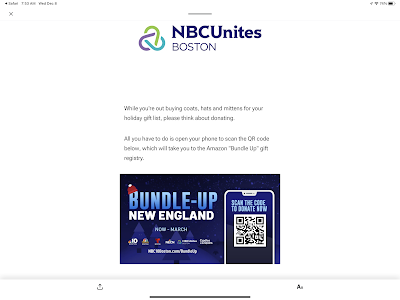
"While you're out buying coats, hats and mittens for your holiday gift list, please think about donating.
All you have to do is open your phone to scan the QR code below, which will take you to the Amazon "Bundle Up" gift registry."
They have neglected to place a clickable URL to the Amazon "Bundle Up" gift registry on the webpage.
I'm on your webpage with a computer. Give me a link to click!
I scanned the QR code with my phone, went to the Amazon "Bundle Up" gift registry on the webpage, copied the link, emailed it to myself, and copied and pasted it into this blog post for you.
Here is the Amazon "Bundle Up" gift registry link:
https://www.amazon.com/hz/wishlist/ls/3RIM90K6QZBM1/ref=hz_ls_biz_ex
UPDATE:
They saw this post and added a clickable link.
Great!
I ordered a bunch of jackets. ;-)

Let's say you have your main TV hooked up to Xfinity in your Great Room, but then you have a second TV in your bedroom that doesn't have a cable TV box, and you want to watch NBC TV shows like The Today Show on it.
Here are three solutions to allow you to watch NBC broadcast TV on a TV where you've 'cut the cord'.
The Xfinity Stream app for Partner Devices is currently offered in a "beta" version that doesn't include the full set of features and functionality that comes with the Xfinity Stream app or the web portal. Future releases of the app will include additional features and functionality, as well as improved stability and optimization. When using the "beta" app, you won't be charged an "additional outlet" service charge. Pricing may change in the future. Please note that Xfinity X1 is the best way to watch Xfinity TV, and not all features of X1 are available if you choose to use a Partner Device. See below for more information."

Anyone who is doing video meetings should have a couple of lights like this to improve their video's look.
I'll be cutting the cord in 2021 and am researching How to Live Stream Local TV Stations on my Android TV.
My local stations are ABC, CBS, NBC, 7 News, NECN, and Fox 25. I'd also like HGTV. ;-)

Here are the options that I am considering and will update this post as I learn more about each option.
Note: This is a working document with changes and updates being made as I do more research and talk with some of the providers. Please look at the provider's site to see CURRENT plans and rules. I need to determine if I would be getting LOCAL news with each package too.
I will probably be getting an Internet package from Xfinity.
1. Digital Antenna
ABC, CBS, NBC, Fox.
2. YouTube TV $64.99/month
ABC, CBS, NBC, Fox, HGTV.
3. Hulu + Live TV $64.99/month
ABC, CBS, NBC, Fox, HGTV.
4. Tubi TV FREE
Fox local depending on where you live
5. Philo $30.00/month
HGTV
6. Sling $30/month
HGTV
7. Pluto TV Free
CBSN, CNN, NBC News Now, Sky News
8. Locast Free
ABC, CBS, NBC, 7 News, and Fox 25.
9. Xfinity Flex + Limited Basic/Choice 10+ TV $30/month
ABC, CBS, NBC, 7 News, NECN, Fox 25, and PBS.
Restrictions apply. Not available in all areas. New residential customers only. Limited to Choice Limited TV. Equipment, installation, taxes and fees, Broadcast TV Fee (up to $19.45/mo.), Regional Sports Fee (up to $14.45/mo.) and other applicable charges extra. Pricing subject to change. Service limited to a single outlet. May not be combined with other offers. Limited Basic service subscription required to receive other levels of service. On Demand selections subject to charge indicated at time of purchase. Not all programming available in all areas. 30-Day Money-Back Guarantee applies to one month’s recurring service and standard installation charges up to $500. ©2021 Comcast. All rights reserved.
(Add 100 Mbps Internet - Total $54.99/month)
Limited time offer. Restrictions apply. Not available in all areas. New residential customers only. Limited to Choice Double Play. Offer requires enrollment in both automatic payments and paperless billing. Must enroll within 30 days of placing the order. Without enrollment, the monthly service charge automatically increases by $10. The automatic payment and paperless billing discount is for a period of 24 months and will appear on the bill within 30 days of enrolling. If either automatic payments or paperless billing are subsequently cancelled during the 24-month term, or services are reduced to Xfinity TV Limited Basic service only, the $10 monthly discount will be removed automatically. Kit offer for kit serviceable locations only. Limit one kit per customer. Equipment, installation, taxes and fees, Broadcast TV Fee (up to $19.45/mo.), Regional Sports Fee (up to $14.45/mo.) and other applicable charges extra, and subject to change during and after the promo. After promo, or if any service is cancelled or downgraded, regular rates apply. Comcast's monthly service charge for Choice Double Play is $89.99 and for upgrading from Performance Internet to Performance Pro Internet service is $15.00 more per month (subject to change). Service limited to a single outlet. May not be combined with other offers. TV: Limited Basic service subscription required to receive other levels of service. On Demand selections subject to charge indicated at time of purchase. Not all programming available in all areas. Internet: Actual speeds vary and are not guaranteed. For factors affecting speed visit www.xfinity.com/networkmanagement. 30-Day Money-Back Guarantee applies to one month’s recurring service and standard installation charges up to $500. ©2021 Comcast. All rights reserved.
10. Xfinity Flex + Preferred 220+ TV $69/month
ABC, CBS, NBC, 7 News, NECN, Fox 25, HGTV, and PBS.
Limited time offer. Restrictions apply. Not available in all areas. New residential customers only. Limited to Digital Preferred. Offer requires enrollment in both automatic payments and paperless billing. Must enroll within 30 days of placing the order. Without enrollment, the monthly service charge automatically increases by $10. The automatic payment and paperless billing discount is for a period of 24 months and will appear on the bill within 30 days of enrolling. If either automatic payments or paperless billing are subsequently cancelled during the 24-month term, or services are reduced to Xfinity TV Limited Basic service only, the $10 monthly discount will be removed automatically. Kit offer for kit serviceable locations only. Limit one kit per customer. Equipment, installation, taxes and fees, Broadcast TV Fee (up to $19.45/mo.), Regional Sports Fee (up to $14.45/mo.) and other applicable charges extra, and subject to change during and after the promo. After promo, or if any service is cancelled or downgraded, regular rates apply. Comcast's monthly service charge for Digital Preferred, ranges based on area, from $76.70 to $85.20 (subject to change). Service limited to a single outlet. May not be combined with other offers. Limited Basic service subscription required to receive other levels of service. On Demand selections subject to charge indicated at time of purchase. Not all programming available in all areas. 30-Day Money-Back Guarantee applies to one month’s recurring service and standard installation charges up to $500. ©2021 Comcast. All rights reserved.
Additionally, I am researching the iOS news apps for the local stations.
11. Don't Cut the Cord:
Xfinity Flex + Select + 205 + TV + Internet up to 300 Mbps $89.99/month
ABC, CBS, NBC, 7 News, NECN, Fox 25, HGTV, and PBS. Plus more including AMC, BBC America, BBC World News, Bravo, CNN, CNBC, ESPN, Food, NESN, SYFY, and lots more cable channels...
Requires xFi Gateway
Available for $14/mo at checkout.
First TV Box
$7.5/mo

Additional TV Box
$7.5/mo

Cloud DVR Service
Limited time offer. Restrictions apply. Not available in all areas. New residential customers only. Limited to Select+. Offer requires enrollment in both automatic payments and paperless billing. Must enroll within 30 days of placing the order. Without enrollment, the monthly service charge automatically increases by $10. The automatic payment and paperless billing discount is for a period of 24 months and will appear on the bill within 30 days of enrolling. If either automatic payments or paperless billing are subsequently cancelled during the 24-month term, or services are reduced to Xfinity TV Limited Basic service only, the $10 monthly discount will be removed automatically. 2-year minimum term agreement required. Early termination fee applies if all Xfinity services are cancelled during the agreement term. Kit offer for kit serviceable locations only. Limit one kit per customer. Equipment, installation, taxes and fees, Broadcast TV Fee (up to $19.45/mo.), Regional Sports Fee (up to $14.45/mo.) and other applicable charges extra, and subject to change during and after the term agreement. After first 12 months, monthly service charge for Select+ increases to $109.99 per month for months 13-24. After term agreement, or if any service is cancelled or downgraded, regular rates apply (subject to change). Service limited to a single outlet. May not be combined with other offers. TV: Limited Basic service subscription required to receive other levels of service. On Demand selections subject to charge indicated at time of purchase. Not all programming available in all areas. Internet: Actual speeds vary and are not guaranteed. For factors affecting speed visit www.xfinity.com/networkmanagement. 30-Day Money-Back Guarantee applies to one month’s recurring service and standard installation charges up to $500. ©2021 Comcast. All rights reserved.
89.99
14.00
7.50
7.50
------
118.99
=====
Equipment, installation, taxes and fees, Broadcast TV Fee (up to $19.45/mo.), Regional Sports Fee (up to $14.45/mo.) and other applicable charges extra, and subject to change during and after the term agreement.
12. Fubo.tv $64.99/month
ABC, CBS, NBC, FOX 25, HGTV, and PBS.