Labels

Categories: Food | Travel | Beer | Wine | Boston | Humor | TV | Tech | Pop Culture | Politics | Golf | Video | Photo | Auto
Sponsored: Samsung | Cadillac | Volt | GMC | AT&T | Gear List: Cameras, Lights, Microphones, etc.
More: SteveGarfield.com | Steve Garfield's Video Blog (archived 6/19/2013)
“As an Amazon Associate I earn from qualifying purchases.” | Mastodon
Showing posts with label apple. Show all posts

Wednesday, November 07, 2018

Create and Order a 2019 Calendar in Apple Photos App with the Mimeo Photos Project Extension

Now that Apple has removed the ability to create and print calendars from it's Photos App, you can now Create and Order a 2019 Calendar in Apple Photos App with the Mimeo Photos Project Extension.

Mimeo was the company that Apple used to print calendars within the Photos App, so not much has changed.

INSTALL
Install the extension to the Photos app via the link above, then use it to create a new calendar.

DRAG
You have to have your photos on the Photos app, then drag them in to your Calendar project.


OPEN AND CREATE
Open the new calendar project and create your calendar months with one or more photos per month. If your photo gets a red exclamation point, that's the app telling your that the photo doesn't have a high enough resolution to print. In that case, you can choose another photo, or reduce it's size on the page, or choose more than one photo on the page, thereby reducing it's size.


ADD EVENTS
In this step, you need to add events like birthdays and anniversaries by hand, one at a time. IN the old app, it imported your events from your Apple Calendar. Not anymore. It would be nice if you could easily add them all in the events sidebar, but you are required to open each month, double click on the day, then add your even in a pop up box. This needs to be streamlined.

ORDER
Click the button to order a calendar for $19.99. Once in the order entry screen you add shipping details and then you can increase your quantity if you want.

I'm excited to continue to have this calendar creation feature available from Apple. Last year I tried a few other options the the size was too small, and the paper quality wasn't as good. One thing to note, I received immediate answers to my questions via messaging with Mimeo Photos product support.

HAPPY 2019!

Friday, April 28, 2017

My First Investment

My first investing advice came from message boards on the dial-up internet.

After I got my first job, it was a while before I felt like I had some extra money to invest.

Until then, I kept my money in a savings account in a bank, and let it sit there.

LEARNING ABOUT THE STOCK MARKET
When I was in high school I had a teacher that taught us about the stock market. I really enjoyed his class. He had me bring my copy of the Boston Globe into school each day. This was back when they printed stock tables in the newspaper. And yes, I walked to school every day, up a hill, both ways! ;-)

Each student picked a stock and we tracked it’s performance over time. I looked forward to tracking my stock’s performance each day.

GETTING ADVICE
When it came time to invest real money, I turned to online forums to help demystify the investing process. If I remember correctly, I dialed on to online services like Prodigy, and AOL, and joined finance discussions.


Image: Prodigy Online Service Login Page

One popular suggestion for investing was to invest in things that you knew about, that were to growing.

BUYING STOCKS ONLINE
I opened up an online brokerage account, and invested some money. It was a good way to learn about the stock market, and how to buy and sell stocks.

I ended up buying and selling a few stocks based on my online research and direct experience with the companies.

One stock that I ended up buying, after learning how, was Apple. That was a good stock to buy. ;-)

I bought Apple because I worked at a computer store, and was trained by Apple on the first Macintosh computer in 1984. I then became the local Macintosh expert, handling sales and doing demonstrations of the computer. I got to know it very well and decided that it would be a good investment.


Image: Apple Macintosh

There’s a cool website called InvestedInstead that shows you what your investment would be worth today, if you invested your money in a companies’ stock instead of their product.

As of 4/22/2017, if you had invested $2,495 in Apple (NASDAQ:AAPL) stock on 1/24/1984, that investment would have grown 347 times to $866,800. [See Macintosh Results as of today]

This experience gave me the step-by-step knowledge of HOW TO BUY A STOCK.

Investing in individual stocks like this is more risky than spreading out the risk in a mutual fund made up of many stocks.

FUTURESMART APP

Image: FutureSmart App

An app that you can use to learn about investing and personal finance is the MassMutual #FutureSmart App.

One lesson from the #FutureSmart App confirms what I learned: “Investing your money in a mix of stocks, bonds, and mutual funds can help reduce your risk."

Get the FutureSmart App for free.

WHAT I LEARNED
Online brokerage accounts make it easy to buy and sell stocks.

You can never know when a stock will got up or down. You can’t worry about it either. I take the long term approach of buy and hold.

I’m a long way off from that day that I bought my first stock. I am still holding on to some of those early stocks, and buying some other individual stocks, where I have direct experience with the companies, like Disney and Facebook.

I now also work with a financial planner to help me spread out my risk with investments in some professional managed funds, where the only decision I have to make is how much money to put into the fund.

Good luck with your own personal investing journey.

Disclosure: This has been a sponsored post for MassMutual.

Friday, October 28, 2016

Tech21 Evo Mesh Case for iPhone 7

The Tech21 Evo Mesh Case for iPhone 7 is available exclusively at the Apple Store.
Tech21's Evo Mesh Case powerfully safeguards your iPhone 7 with intelligent impact protection. That means impact force is absorbed, dissipated, and repelled away from your iPhone thanks to scientifically proven, hybrid impact-protection FlexShock material that’s injection molded into the Energy Absorbing System (E.A.S.). Ultra-thin and extremely lightweight, Evo Mesh offers tough protection for your iPhone, while preserving its natural beauty.
The information on the box and the website states that this case protects your iPhone from 9.9 foot drops.


That's better than what the standard Apple Leather case would do.

I've had this case for less than a week and really like it. All the buttons work fine and there's room for many different lightning connectors that I've tried.

Lists for $39.95 online.

Tuesday, January 06, 2015

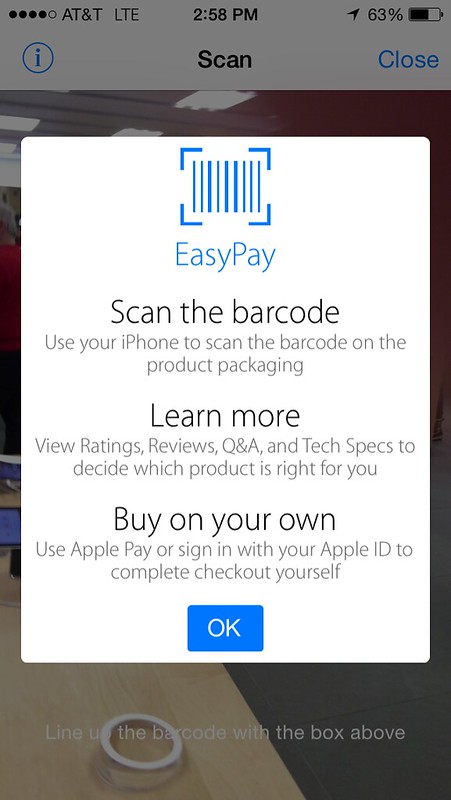
Apple Store: iPhone Apple Pay Self-Checkout

When you are in an Apple Store you can use your iPhone to scan in a bar code and use Apple Pay to self-cehckout.

Wow.

Apple Pay in the Apple Store

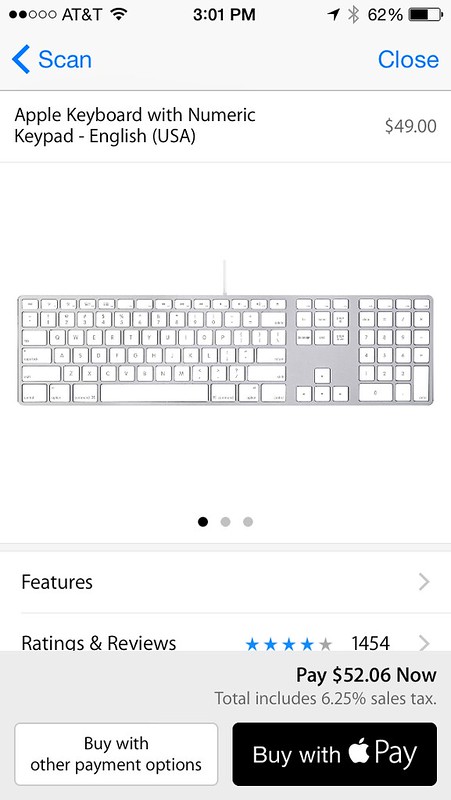
I thought this was great, so I scanned in a keyboard that I was considering buying.

Apple Pay in the Apple Store

I was ready to buy with Apple Pay, but then I clicked on the reviews.

And they were bad.

So I didn't buy the keyboard.

But I still think this is cool.

Thursday, November 29, 2012

iTunes Movie Trailers - Online and in iTunes 11

iTunes Movie Trailers
Image: iTunes Movie Trailers

Online at http://trailers.apple.com/trailers/

iTunes 11 Movie Trailers
Image: iTunes 11 Movie Trailers

In iTunes here [Link opens iTunes].

Looks better online.

Sunday, January 20, 2008

Mitt Romney, the Reporter, and Journalism


THE UPTAKE, DERAILING THE NARRATIVE: Chuck Tomlinson and Stacker Manfield comment on the exchange between Mitt Romney and Associated Press reporter Glen Johnson - and how it relates to our brand of citizen journalism.

Monday, January 07, 2008

One Year of my MacBook Pro Service History

My MacBook Pro has been sent back to Apple for service. After the year's worth of problems detailed here, I am expecting a new MacBook Pro as a replacement.

Apple Water

One Year of my MacBook Pro Service History

Dec 06
Logic Board, Top Case and Battery replaced

April 07
Keyboard Replaced

June 07
Logic Board, Hard Drive and Display replaced

August 07
Logic Board replaced

December 07
Sound Board I/O Card replaced

After picking up my MacBook Pro, the system would not power on.

The Logic Board and Hard drive now needs to be replaced and the MacBook Pro has been sent back to Apple.

Update:

Apple is replacing my MacBook Pro with a new model:

2.4GHz Intel Core 2 Duo
2GB 667 DDR2 SDRAM - 2x1GB
160GB Serial ATA Drive @ 5400
SuperDrive 8X
MacBook Pro 17-in GLSY WidesS

Thanks Apple.

Monday, July 09, 2007

How To: Set Up A New Macintosh

Here are the settings and programs I set up when putting together a new Macintosh.

1. Disable Caps Lock
System Preferences, Keyboard, Modifier Keys. Set Caps Lock Key to No Action.

I just hate it when I'm in the middle of typing somETHING AND ALL THE WORDS ARE IN CAPS, oops, because you hiy CAPS LOCK by mistake. Ha ha. Why is there a CAPS LOCK key any way? I can't think of one reason to use it. So I don't.

2. Dock
Apple Menu, Dock, Dock Preferences
Dock Size - Smaller
Automatically hide nad show the dock

3. Safari
Safari Menu, Preferences
Appearance - Standard Font - Verdana 18
Tabs - Enable Tabbed Browsing

View Menu
Show Status Bar

4. iChat
Add AIM username/password

5. flickr
Downlod and install Flickr Uploader.
There are others, but I'm used to this one. Just drag and drop from iPhoto and upload. Easy.

6. Text Wrangler
Text editor


7. ImageWell
Image editing application that lets you quickly resize, crop, watermark, edit your images, take screenshots and then upload them to the web, save to your computer or email them to a friend. The cool thinkg I like about ImageWell is that you can grab and image and then upload it to y our host. ImageWell then can save the HTML code that points to this image to your clipboard so you can go to your blogging software and paste the code right in.

8. Final Cut Studio
This takes about three hours to install. You can now choose alternate locations for all the image and data files prior to installation. That's cool.

9. SnapZPro X
Handy to capture video and save to disk.

10. Adobe Photoshop

11. Microsoft Word/Excel
If you don't already own these you can try Google Docs and Google Spreadsheet.

12. VueScan
HP scanner software support.

13. TypeIt4Me
Corrects common typing mistakes.

14. RBrowser
Free FTP client

15. Windows Media Players
Windows Media Player 9 for Mac OS X
Windows Media® Components for QuickTime, by Flip4Mac™.
Microsoft stopped supporting the Mac at version 9 and hte current PC version is 11. D'oh!

16. StuffIt Expander 11.0.2
To open downloaded and compressed application, Like Windows Media Player 9, above. D'oh!

17. RealPlayer

18. Skype

[ To Be Continued ]

Add your suggestions in the comments...