Labels

Categories: Food | Travel | Beer | Wine | Boston | Humor | TV | Tech | Pop Culture | Politics | Golf | Video | Photo | Auto
Sponsored: Samsung | Cadillac | Volt | GMC | AT&T | Gear List: Cameras, Lights, Microphones, etc.
More: SteveGarfield.com | Steve Garfield's Video Blog (archived 6/19/2013)
“As an Amazon Associate I earn from qualifying purchases.” | Mastodon
Showing posts with label comcast. Show all posts

Saturday, November 19, 2022

How to move from Xfinity XB7 to XB8 Gateway.

How to move from Xfinity XB7 to XB8 Gateway.

It’s easy. Move the Coax cable from XB7 to XB8. Add power to XB8. In the Xfinity App, choose to Activate xFi Gateway. Follow the steps including, Scan the QR code at the bottom of the XB8.
You will also have an opportunity to copy over your existing Username and Password.

Saturday, January 30, 2021

Setting up Comcast Xfinity Voice Remote

When setting up a new Comcast Xfinity Voice Remote, the instructions tell you to hold XFINITY and INFO for 5 seconds until the RED light TURNS GREEN.

What it should say is, “Hold the XFINITY and INFO for about 5-6 seconds until the RED light CHANGES TO BLINKING GREEN."

Tuesday, January 07, 2020

How To Upgrade Netflix from HD to UHD when subscribed through Comcast Xfinity

Comcast Xfinity has a fairly new package that includes a Netflix subscription. This means that instead of paying Netflix for a monthly subscription, the cost is included in your Comcast Xfinity package, and billed through Comcast Xfinity.

If you want to upgrade your subscription from HD to UHD (4K), you'll get a message on the Comcast Xfinity page to give them a call to change your package.


Don't do that.

Instead, sign into your Netflix account on the Netflix website, and upgrade there. You'll be charged through your Comcast Xfinity billing process.

Sunday, December 29, 2019

How To: Getting Netflix, Amazon Prime Video, Hulu, Disney+, YouTube and CBS All Access on Sony Android TV

I'm planning for the imminent installation of my SONY A9G Master SERIES OLED 4K ULTRA HD HDR 65” TV.

Here's how to get Netflix, Amazon Prime Video, Hulu, Disney+, YouTube and CBS All Access through the Android TV apps on the TV. HBO and Starz will be through Comcast Xfinity, and Apple TV+ will be through my Apple TV box.

Over time the majority of these apps will be available via the Comcast Xfinity X1 box, and not require separate apps.


NETFLIX
Some of the Netflix ready devices include a NETFLIX button on the supplied remote that can be used to launch the app. If the remote for your Netflix ready device doesn't include a NETFLIX button, the app can be accessed by pressing the HOME button, and then navigating to the Netflix app. I am subscribing to Netflix through a Comcast Xfinity package.

AMAZON PRIME VIDEO
The Android TV™ supports 4K streaming of the Amazon® Instant Video app. To enjoy 4K streaming of the Amazon Instant Video app, download and install the latest software update for the Android TV. Amazon Prime Video is included with Amazon Prime.

HULU
There is one Hulu app on all of our Android TVs. The service you receive will depend on your Hulu subscription plan. I am paying for Hulu without commercial.

Disney+
The Disney+ Android app can be installed from Google Play™ Store or Sony Select on your Android TV. I bought a three year subscription to Disney+.

YouTube
You can play 4K movies on the YouTube® app with a compatible Android TV™. Free.

CBS ALL ACCESS
If you own an Android TV you can use the official CBS All Access app from the Google Play Store. I will be subscribing through the CBS All Access app.

COMCAST Xfinity Box
- HBO
- STARZ

Note: To make things easier, bundled in with the Comcast Xfinity interface, you can also get these streaming services via the X1 box:
- Netflix
- Amazon Prime Video
- YouTube

Coming Soon:
- Hulu
- CBS All Access

APPLE TV Box
- Apple TV+

More:
Setup and Troubleshooting Video Streaming Services
This page provides common Setup and Troubleshooting information for Netflix, Amazon Prime Video, Hulu, Disney+, and YouTube.

Saturday, March 30, 2019

I’m reverse-cord-cutting, saving $20.94/month

I’m reverse-cord-cutting, saving $20.94/month.

XFINITY with NETFLIX included.


I just signed up for a new Xfinity plan where Netflix is included.

No more monthly payments to NETFLIX for their Standard plan with HD quality, saving $12.99/month.

REMOVE Cable card

Just removed the monthly fee of $7.95 for my Xfinity cable card that was supporting my Tivo.

I've switched over to Xfinity X1 as my DVR.

Goodbye TiVo. It was nice.

You don't need a cable card to watch your recorded programs.


One thing that kept me from getting rid of TiVo was the accumulation of unwatched shows I have on there. Good shows.

So after watching our last, TiVi recorded, must see episode of that lawyer show Carol likes, and confirming that a good amount of the other shows are available ON DEMAND at Xfinity, I canceled the cable card.

I removed the cable card to drop it off at an Xfinity store. The TiVo then said, "Hey. You removed my cable card! How are you going to watch TV?"

The TiVo then asked me how I wanted to proceed, so I selected to get my program information from the INTERNET, and my TV SOURCE would be from an OVER THE AIR ANTENNA.

The TiVo then scanned for available stations, and downloaded program information for those that it found.

NOTE: I don't have an antenna, and I'm not going to get one.

After TiVo did all this, I clicked over to my recorded programs and they were still there, and I have access to them.

So the answer to the question is: YOU DON'T NEED A CABLE CARD TO WATCH YOUR RECORDED PROGRAMS.

Friday, September 22, 2017

Extending Xfinity Gigabit Internet Wi-Fi with Netgear Orbi

I just installed Xfinity Gigabit Internet at home. Disclosure: Upgrade cost for me is $17/month, difference between Blast! and Gigabit Internet today, covered by Xfinity for one year trial.


Initial wired speed tests show a big difference. 700 Mbps DOWN, 41 Mbps Up.


Image: Speed Test Results

Results vary depending on your hardware configuration. I have a MacBook Air circa 2011, which I am told cannot support 1 Gig speeds, with a Thunderbolt monitor that has a gigabit ethernet port.

The new modem comes with WiFi built in. I compared it's 5G network to extending the Wi-Fi with the Netgear Orbi System. (Orbi - Two free review units, one purchased)

Here's my earlier review of the Orbi system, Review: Installing Orbi Home WiFi System by NETGEAR, and one of it's competitors eero, eero 2nd Generation installation at Loring Greenough House.

Wi-Fi SPEED TESTS:

OFFICE - 3rd Floor
ORBI (Wired Base orbi) 420 Mbps
Xfinity 5G (Modem sits here) 420 Mbps

LIVING ROOM - 2nd Floor
ORBI 210 Mbps
Xfinity 5G 170 Mbps

KITCHEN - 2nd Floor
ORBI (Wi-Fi Satellite Orbi) 310 Mbps
Xfinity 5G 86 Mbps

DEN - 2nd Floor
ORBI (WiFi Satellite Orbi) 330 Mbps
Xfinity 5G 120 Mbps

FRONT DOOR - 1st Floor
ORBI 250 Mbps
Xfinity 5G 26 Mbps

The new Xfinity Gigabit Internet modem/router coverage is impressive.

In Boston, a current 3 or 2 product customer could get it added to their current suite of services for an additional $15-30/month depending on their package or if they were Internet only it’s $79.99/month for 24 months.

Read more here: Comcast Introduces Gigabit Internet Service in Boston.

New and current customers can visit Xfinity.com/gig to learn about the new service and request additional information.

Later this year Xfinity will be coming out with their own mesh network, Comcast is trying to get in on the mesh router hype
Later this year, Comcast will put out mesh-creating “Wi-Fi pods” that were designed in collaboration with Plume. These pods will plug into customers’ home power sockets and auto-configure to the network, similar to how Plume’s own product works.

Friday, May 19, 2017

XFINITY TV anywhere in your home via WiFi

Xi5-P allows you to put XFINITY TV anywhere in your home via WiFi, without a a cable connection. Powered by USB-C and connects to TV via HDMI. Supports High Dynamic Range (HDR), but not 4K/UltraHD, that will come in a future device.

Requirements: "To have a Wireless TV box in your home, you'll need XFINITY TV service, at least one additional X1 TV box to act as the primary X1 device on your account and XFINITY Internet with a Wireless Gateway 3 (with RDK-B firmware) to stream video over the Xi5's WiFi connection."

Update: This mini box currently has a $9.95 monthly charge.

Xi5 TV Box FAQ

Sunday, August 02, 2015

Xfinity Customers: Restart your Modems, Test your Speed

Speed Test from XFINITY®

Yup, 176 Mbps download speed is fast. Thanks Xfinity!


Earlier: Comcast adds faster Internet:
To keep pace with customer demands for faster Internet speeds, Comcast is boosting its most popular 50 megabits-per-second Internet plan to 75 megabits-per-second at no added charge – and adding a new speed level, 150 megabits-per-second...

Saturday, December 20, 2014

How to Fix: Comcast Xfinity TV Go Video Loading Adobe Flash Problem

It's cool that you can watch live video via Xfinity TV Go, but sometimes the videos don't play, and you're stuck on a VIDEO LOADING page.

You might have brought this on yourself by changing a setting in Google Chrome that keeps videos from automatically playing.

You thought it was a good idea at the time, because it sped up the browser, but then when you wanted to watch some live video, you had NO IDEA how to make it work.

I went over to the ADOBE web site, looked around at a message board where a lot of people were complaining, some even saying to DELETE Chrome and reinstall.

Well, sometimes that works, and in this case it probably would, by resetting all the settings, but I figured out how to get videos to play again on Xfinity TV Go, but just changing one setting in my browser settings...

Hope this can work for you.

Here's how I did it.

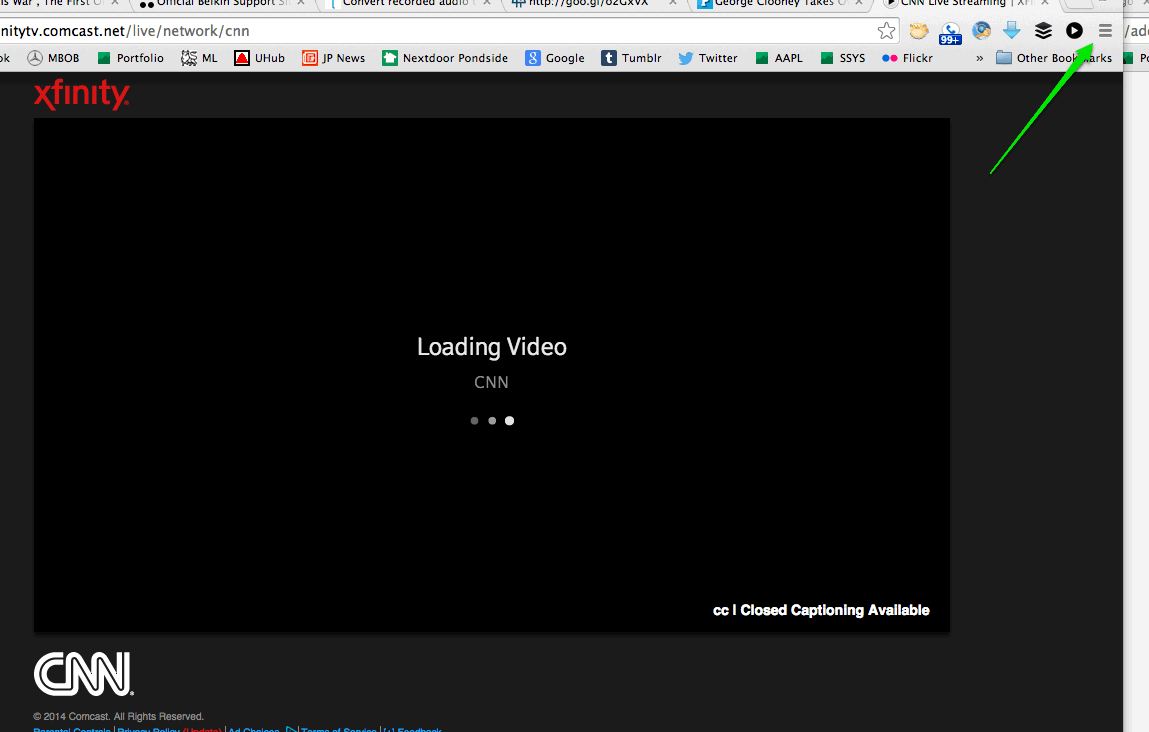
Here you are seeing 'LOADING VIDEO...'


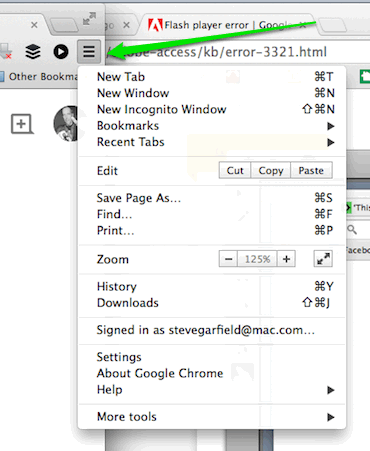
CLICK THE 'TOP RIGHT MENU ICON'
SELECT 'SETTINGS'


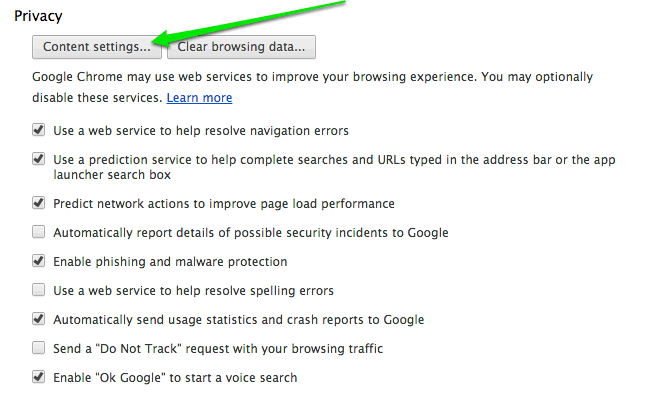
UNDER PRIVACY
CLICK 'CONTENT SETTINGS'


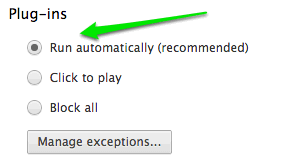
UNDER PLUGINS
CLICK 'RUN AUTOMATICALLY'


Wednesday, December 22, 2010

The Comcast Xfinity TV App doesn't work with a Comcast DVR with the TiVo Upgrade


Photo Courtesy Comcast: The Comcast Xfinity TV App

The Comcast Xfinity TV App doesn't work with a Comcast DVR with the TiVo Upgrade.

TiVo Central on Comcast DVR
Comcast DVR with the TiVo Upgrade

You'd think that early adopters of an advanced user interface would get Xfinity iPad/iPhone App support.

You can schedule recordings online for the Comcast DVR with the TiVo Upgrade. What's the difference between using the Comcast Xfinity TV App?

Customer support told me that I'd have to downgrade my Comcast DVR, removing the TiVo Upgrade to allow the Comcast Xfinity TV App to work.

Seems like a programming issue to me.

Can I get some clarification? A timetable?

TWITTER UPDATE:

When will it work with TiVo? Thanks. RT @ComcastBill: @stevegarfield Correct it does not work with Tivoless than a minute ago via Tweetie for Mac


@stevegarfield I can honestly say I'm not sure.less than a minute ago via TweetDeck


Comcast Chat:

Ashley > Is there anything else that I can help you with?
Steve_ > when will Xfinity TV App work with a Comcast DVR with the TiVo Upgrade
Ashley > Let me check on this.
Ashley > You may check this link www.xfinitytv.com for updates.
Ashley > I apologize but there's no update yet here.
Steve_ > Please find out and email me the status. Is thre a timeframe? Are people wrking on this?
Steve_ > Please do some research and get back to me rather than asking me to check the website.
Ashley > Please wait, I am checking this further.
Ashley > You may check is it is available now on your area by checking fancast.com/mydvr
Steve_ > No. It is available in my area. It just doesn't work with the Comcast DVR that's been upgraded with TiVo interface.
Ashley > Oh, I am sorry to know that.
Ashley > You may swap your cable box Steve.
Steve_ > Can you pass this along to someone who can answer me and email me back?
Steve_ > No. The BOX is not the problem.
Steve_ > Please, the box is fine. It's the TiVo upgrade that is the problem.
Ashley > Sure! You can send an email here http://www.comcast.com/Corporate/Customers/contactus/ContactUs.html
Steve_ > I want a timeframe whe Xfininity app will be supported on Comcast TiVo DVR.
Ashley > This is within 2 to 3 months.
Ashley > Is there anything else that I can help you with?
Ashley > It has been my pleasure to have assisted you today . I'm happy you contacted Comcast.

Friday, April 24, 2009

Caprica: Watch on Panasonic VieraCast or Tivo HD

I want to watch the preview of next season's Caprica TV show and am looking into streaming it to my TV.

Amazon Video on Demand allows you to view the show online, download to a PC or portable device, and also send it to either a TiVo box or connected device, which in my case is a Panasonic TV with VieraCast.

Once you sign up and register your device, you can watch either way. The differences are interesting.

Let's look at hte specs:

TiVo HD
File Size 3.8 GB
Bitrate 5000 kbps
Aspect Ratio 1.78:1
Audio Channels 5.1
With the TiVo you are downloading the video and watching like you would any other TiVo show. NOte the audio is 5.1.

Pansonica VieraCast
Variable Bitrate
300 Kbps
600 Kbps 480p
900 Kbps 480p
1.2 Mbps 480p
2.5 Mbps 720p HD
Aspect Ratio 1.78:1
Audio Channels 2
With VieraCast you are streaming the video in real time with no wait to start watching. Quality will vary depending on your bitrate.

I'm getting a download speed of 29,728 so I should see the highest quality.

Have you tried either of these methods. I'd love to hear you thoughts.

I purchased this episode on Amazon On Demand and when my purchase was complete, I clicked to Download it to my TiVo.

Got this acknowledgement back.


I like the idea of being able to pause the show with my TiVo.


Update II:

Just watched the Caprica downoad on the TiVo HD. Awesome. Perfect sound and picture qualtiy.

Great show too.

I'm looking forward to next year and the series.

Wednesday, February 20, 2008

Speed Test is Faster with OpenDNS


Speakeasy - Speed Test:
"Last Result:
Download Speed: 29813 kbps (3726.6 KB/sec transfer rate)
Upload Speed: 2713 kbps (339.1 KB/sec transfer rate)"
Wow.

After installing OpenDNS on my router, the speeds here are faster.

More:
Scott Beale on OpenDNS.

Tuesday, February 12, 2008

Dear Comcast: AT&T is smarter than you

Logan Airport Tower

Media 3.0 and MediaBytes With Shelly Palmer - Technology, Media and Entertainment News and Opinions:
"STARBUCKS has dropped T-MOBILE and will use AT&T to supply WiFi to its coffee shops. Customers will be given free access when making purchases on a Starbucks card. In addition, AT&T’s 12 million broadband subscribers will have free access to the networks"
Dear Comcast,
Please provide your broadband subscribers free access to the Comcast WiFi network at Logan International airport.
K Thx Bye,
--Steve

Comcast Rep Joins TiVo Community

HD View: Sorted by Title

Comcast Rep on AVS forum - TiVo Community:
"As I noted in my earlier post, there will be a software release coming in the next several weeks that will address many of the reported issues, including some of the complaints users have had with Suggestions behavior (including the intrusiveness of the prompts), improvements to the HD filter on the guide, and Dolby Digital output will work correctly on DCH set-top boxes."
Comcast is taking a step into social media.

Comcast Rep posts about an upcoming upgrade to the Comcast TiVo box which addresses my issue with the guide.

Thanks Brian for letting me know that Comcast Rep is out there. Comcast Rep is on the AVS forum too.

Good idea to join the existing discussion where the people are. It would be better if you used a real name though... :-)

Next up, replying to blog posts on blogs.

Monday, December 31, 2007

Comcast DVR with TiVo: Video Tour


In this video [ 5:16 ] I give you a quick tour of the Comcast DVR with TiVo. We take a look at TiVo recordings, the Guide, and Find Programs.

Response time could be improved.

Saturday, December 29, 2007

Can We Sort Comcast TiVo Out?

Movie View: Sorted by Time

When you sort for upcoming movies on a Comcast TiVo it sorts by Time.

HE View: Sorted by Title

When you sort for upcoming HD programs on a Comcast TiVo it sorts by program name.

No way to change the sort. I'd prefer it to be sorted by time...

Comcast TiVo Yellow Screen of Death


Comcsst TiVo Yellow Screen of Death - Originally uploaded on flickr by stevegarfield.

While trying to record a movie with my new Comcast HD TiVo, the TiVo rebooted and then I got this screen.

The "Comcast TiVo Yellow Screen of Death?"

Maybe it's actually the "Comcast TiVo Yellow Screen of Life" since I saw it during the reboot.

Wednesday, December 26, 2007

Comcast TiVo HD Guide


Checking out the new Comcast Tivo HD Program Guide.

Shows in HD are designated by 'HD'. There's also a button to filter out all shows so that only HD shows are displayed, you can also do it via an on screen menu. It took 53 seconds for the screen to refresh. Movies, Kids, Sports, and News come up right away, as does All, but HD takes a long time.

Here's a video of hte Comcast Tivo HD Program Guide if you want to see.

I logged onto Comcast chat and was told that Comcast is aware of the problem and has contacted the hardware manufacturer.

Why do I have to Beta Test these products for free after they are publicly released? Didn't they have a Beta Test period where these things should have been ironed out?