Labels

Categories: Food | Travel | Beer | Wine | Boston | Humor | TV | Tech | Pop Culture | Politics | Golf | Video | Photo | Auto
Sponsored: Samsung | Cadillac | Volt | GMC | AT&T | Gear List: Cameras, Lights, Microphones, etc.
More: SteveGarfield.com | Steve Garfield's Video Blog (archived 6/19/2013)
“As an Amazon Associate I earn from qualifying purchases.” | Mastodon
Showing posts with label twitter. Show all posts

Wednesday, June 24, 2020

How To Play a YouTube Video On Your Twitter Timeline

I recently saw a video playing on The Tonight Show's Twitter timeline with an overlay link that said "Watch now at youtu.be"


What was cool about it was that it looked like it was a YouTube video, playing right on the twitter timeline. 

But it wasn't! It's actually a native twitter video, playing on the twitter timeline, with a link over to YouTube

Here's the story:

Usually, you have to click on the YouTube videos to get them to play on twitter. 

So this lead me on a search to figure it out. 

My friend David helped me with a tip, he told me that it was an mp4, uploaded to YouTube, and he provided a link to Google, where people were explaining how to do it. 

This link was helpful, How To Add Links To Your Twitter Videos.

There, Mark Zhuk, explained, in November of 2016, that you need to have a Twitter Ads account to be able to add a link to a video. 

Further research and testing, confirmed the process. 

You need to sign up for a twitter ad account at ads.twitter.com

Then you need to add a credit card to the account. 

Then you can upload a video with a link to the same video on YouTube. 

The YouTube video link you enter, gets overlayed on to your twitter video with the link text, "Watch now at youtu.be", giving the impression that the video is hosted over on YouTube, but it's not. 

Here's my tweet with video, linked over to YouTube


Friday, October 09, 2015

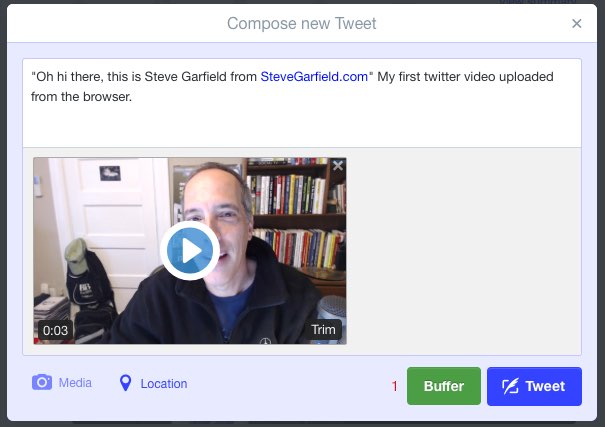
How to Upload a Video on Twitter.com

How to upload a video to twitter from a browser.

GO TO twitter.com

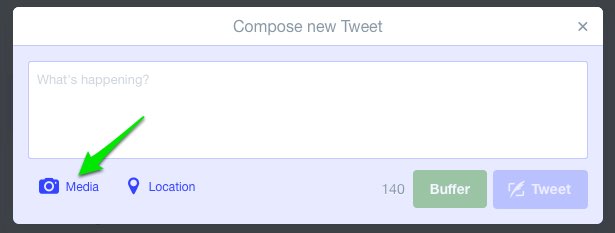
CLICK TWEET


CLICK MEDIA


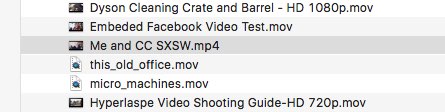
SELECT A VIDEO


More details about formats, from the twitter blog:
What video formats do you support?
We currently support MP4 and MOV video formats on mobile apps.
On the web, we support the MP4 video format with H264 format with AAC audio. You can upload videos up to 512MB, however you will be prompted to edit videos to 30 seconds or less in length.

What are the limitations on video resolutions and aspect ratios that can be uploaded on the web?
Minimum resolution: 32 x 32
Maximum resolution: 1920 x 1200 (and 1200 x 1900)
Aspect ratios: 1:2.39 - 2.39:1 range (inclusive)
Maximum frame rate: 40 fps
Maximum bitrate: 25 Mbps

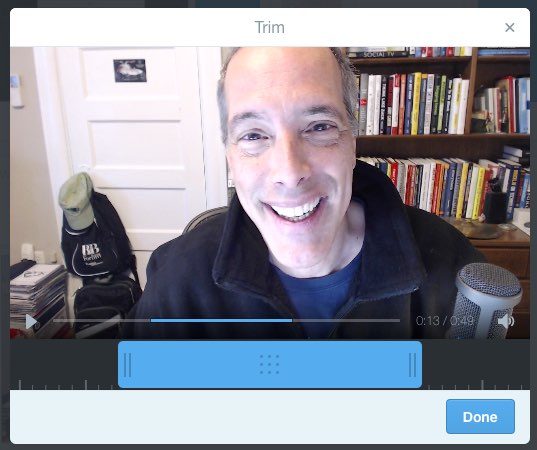
TRIM
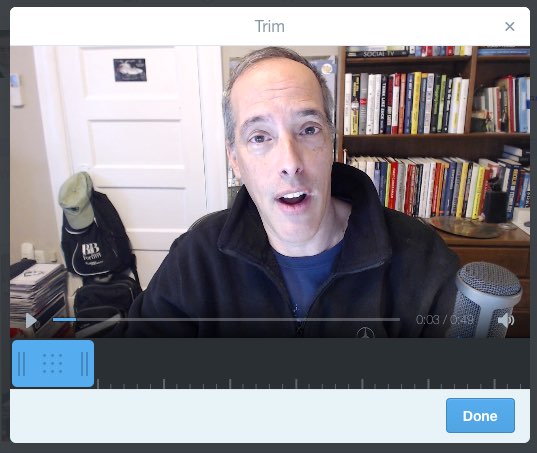
Now you will be presented with the video in a window that lets you trim the length to 30 seconds or less.


CLICK DONE


COMPOSE
Add any text to your tweet.


CLICK TWEET
Click TWEET to share it. After you do that, you'll see a progress indicator showing that your video is uploading.


Then you'll see it processing.

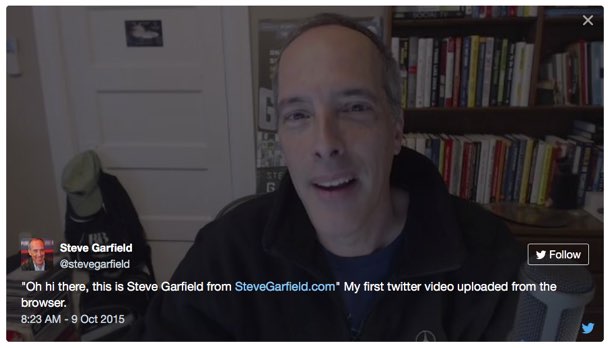
HERE IS THE EMBEDDED TWEET WITH MEDIA INCLUDED:


You can also embed the media only:


Note that a link back to the user and the tweet is embedded into the video for credit.

Click the user name and you go to the user's tweet stream. Click the twitter icon and you see the original tweet.

Wednesday, March 25, 2015

Saturday, February 14, 2015

Twitter Video, It's 30 Seconds.

I wanted to test out Twitter video to see how it might work for reporting.

I initially thought that it could hold 18 minutes of viddeo, but found out with this test that it only supports 30 seconds.


Very cool.

If I wanted a longer report, I'd have to put together a series of twitter video posts. A twitter video storm?

A viewer tweeted in that you can minimize the video, and it still plays, while you are scrolling through twitter posts.


Thanks Jon.

Wednesday, April 03, 2013

Twitter Media Grid: A place for all your Vines, and Videos, and Photos

Jut saw this from my friend CC Chapman:


Update:
After I posted this, I started looking around to see if there was a new Twitter menu to get to this Media Grid. Yup. It's there on the left side bar on the Twitter profile page.

It's a link called See all photos and videos. It's been there for a while. I've never used it. ;-)

Steve Garfield (stevegarfield) on Twitter: View all photos nd videos

Here's my Media Grid:

Steve Garfield (stevegarfield) on Twitter https:__twitter.com_stevegarfield_media_grid

This is cool, and needed.

I have a place for my photos: Flickr.

I have a place for my Videos: YouTube.

A PLACE FOR VINE VIDEOS
But I don't have a place for my Vine videos. Since twitter rolled out Vine, I've been able to share Vine videos, but have only been able to share them one at a time, by tweeting them, posting to Facebook, or embedding them.

Then, the only way to find one of your Vine videos, on the web, was to search back through one of those places to find it.

TWITTER VINE EMBED
Before Media Grid I would have had to search my twitter stream to find this Vine from Easter:


NEW VINE DIRECT EMBED
Now I can use Media Grid to find a recent Vine and embed it with the new Vine embed code:


Earlier: Now you can Embed Vines

NICE START, NEEDS FILTERS
The Media Grid is a nice start for having a page that I can point people to.

It just needs to have a filter for types of content, so a visiter can select: All Photos, All Videos, or Vine Videos.

What do you think?

Wednesday, March 27, 2013

Posting a Photo via Twitter from the Samsung Galaxy Camera EK-GC100

It's easy to tweet from the Samsung Galaxy Camera EK-GC100.

After entering the Twitter App.

This is the text entry screen.

Samsung Galaxy Camera EK-GC100 Screenshots

Tweet in progress looks like this:

Samsung Galaxy Camera EK-GC100 Screenshots

Click to add a photo from your gallery, the second button from the left on the bottom.

YOu could also tae a new photo.

This pops up:

Samsung Galaxy Camera EK-GC100 Screenshots

Hmm. Black screen.

I started searching Google for an answer, and then my photo gallery showed up.

Took a while.

Samsung Galaxy Camera EK-GC100 Screenshots

I clicked to select a photo.

After selecting a photo, you have the option to add effects and/or crop it. When done, you add it to the tweet.

Samsung Galaxy Camera EK-GC100 Screenshots

Samsung Galaxy Camera EK-GC100 Screenshots

Click TWEET and it's published.

Looks like this on twitter:


Thanks @SamsungMobileUSA for the review unit.


Samsung Galaxy Camera EK-GC100 8GB White, Android OS, v4.1 (Jelly Bean) 3G Unlocked HSDPA 850 / 900 / 1900 / 2100 by Samsung from New Generation Products

Friday, February 08, 2013

Dan Winslow Announces Senate Run on Fox 25 News with Maria Stephanos, and Twitter helped.


Image: Dan Winslow Announces Senate Run on Fox 25 News with Maria Stephanos


Thursday, January 24, 2013

Twitter's New Vine Mobile Video Camera App: 6 Seconds, or Less


Hmm, I've already got YouTube, Tout, and Lightt.

I guess I'll try it.

How To Find Vine in the Apple App Store
Good luck finding it on the iPhone App store! There are one million games in there with the name 'vine."

Better idea: Go here http://www.vine.co from your browser and click to get the the App Store.

I wonder why it's not just part of the twitter app.

Got it.

After you get the app, when you open it, you see the top editor's pick video.

Right now it's a staring contest.


This will get old, fast.

Here's my first Vine video.


Embed code needs an option to turn off auto play, although at 6 seconds long, with the default of muted audio, it's not that bad.

The ability to easily record multiple clips, one after another, is smart and is going to lead to a lot of creative videos being produced.

Your thoughts?

Update:

It seems like you can only use the back camera on iPhone.

I can't figure out how to tweet a vine, from vine.

Seems like this feature has been removed temporarily to fix it.

Thoughts:

I've been sharing video moments since 2004 on a blog.

Now they get shared immediately via Twitter and FB.

Powerful. Easy. Universal.

Check this from Chris Brogan: 11 Things A Business Could Do With the New Vine App

Looking forward to his book, Vine for Business. ;-)

Thursday, December 06, 2012

Gary's Liquors Does Social Media Outpost Advertising Right

My local liquor store is Gary's Liquors. Everyone there is nice and helpful. Plus they always have a great selection of beer.

They weren't displaying their social media outposts correctly in their Boston Globe ads, so I sent them a note suggesting how to do it right.

"Search for Gary's Liquors on Facebook." Why not just go to Facebook.com/garysliquors directly?

They listened.

Way to go Gary's. Social Media Outposts done right! @garysliquors

Love Gary's. ;-)

Gary's Liquors: Beer!

Find Gary's Liquors on Facebook

Follow Gary's Liquors on Twitter

Monday, April 04, 2011

Barack Obama Kicks Off 2012 Campaign with Social Media


Barack Obama kicked off his 2012 re-election campaign this morning. I first heard the news in an email. I'm interested to see how the campaign uses social media this time around. I followed the campaign last time and wrote about it in my book, Get Seen. I also reported on the campaign using new tools for journalism including streaming live with a cellphone from some campaign events. I'm very interested in what they'll be doing with video this time around.

Right at the start they are using all the tools, email, twitter, YouTube, Facebook, a blog and a website.

The sharing feature on Facebook is going to be big this year.

Let's look at each of the tools I saw in use this morning:

Email:

Obama 2012 Campaign Kickoff Email

The email uses a thumbnail image to represent a video and links to the Obama 2012 campaign website with an embedded YouTube video.

Note that the thumbnail image in the email does not match the thumbnail image on YouTube. That might be confusing to some people who might think there are two different campaign kickoff videos.

Twitter - @BarackObama:

Today, we’re filing papers to launch our 2012 campaign. Say that you're in: http://OFA.BO/bWjHd7 #Obama2012less than a minute ago via HootSuite


It was disappointing to hear that Barack Obama wasn't tweeting himself last time. Let's see how they use the account now.

Obama 2012 website - http://www.barackobama.com/:

Obama 2012 Website Initial Page

The Facebook sharing integration is cool. I hope it doesn't get too noisy on Facebook.

Update: 8:26 AM:

It's getting noisy.

Obama 2012 Are You In on Facebook

I gave permission to the Obama 2012 app to post to my wall. In one way it's exciting to see people join in, but if it gets too cluttered I can always hide or revoke the application by clicking the 'X' and choosing between:

- Remove Post...
- Remove Are You In?...
- Revoke Publishing Rights of Are You in?...


Video is BIG!

Here's the first one.

YouTube: Barack Obama 2012 Campaign Launch Video - "It Begins With Us":


306 views at 7:45 AM Eastern.

Facebook - http://www.facebook.com/barackobama:

Obama 2012 Facebook Page

18,973,087 Likes at 7:54 AM Eastern.

Get Involved - http://www.barackobama.com/get-involved (formerly known as a blog)

Obama 2012 Get Involved

3 Comments at 8:00 AM Eastern.

Your thoughts?

Friday, January 14, 2011

Top 10 Women on Twitter Follow Friday 1/14/11 - #FF

#FF @averagebetty tickles your tummy w/ creative recipes, cooking demos, celebrity
chef interviews + satire. http://averagebetty.com

#FF @MaggieRulli Host at The Pulse Network and general life enthusiast
http://www.facebook.com/MaggieRulli#!/MaggieRulli

#FF @CaliLewis Host of http://GeekBeat.TV. Tech correspondent 4 CNN, FOX +
Sirius 101's GeekTime. I love quiet walks w/ my iPad. And bacon.

#FF @Zadi Producer/Director/Host making stories for an online world. Award-winning
tech & web nerd @epicfu. http://zadi.tv/bio

#FF @AlexaGoddard R&B singer/performer from the UK. http://www.alexagoddard.co.uk

#FF @sarahmerion I have no particular talent. I am merely inquisitive. -Albert Einstein
http://bostinnovation.com/author/sarah/

#FF @melissapierce Creator of Life In Perpetual Beta and hundreds of other less well
known good ideas. http://lifeinperpetualbeta.com

#FF @marketCait Creative thinker, networker, media lover. Enjoy using my brain,
developing strategies, creating results.

#FF @hermioneway Silicon Valley Video Director for TNW,
Founder http://www.newspepper.com and http://Techfluff.TV

#FF @kathrynjones online video innovator & new media expert. First web drama to stream live. http://kathrynjones.tv

Saturday, September 04, 2010

Twitter Improved the is now following you on twitter email


OLD
OLD - Is now following you on twiter email

I guess this changed a little while ago.

I'm glad twitter added a bio and common users that we both follow.

Makes these emails useful now.

Wednesday, November 18, 2009

Retweet

There are too many characters, 136, in this tweet by newmediajim to retweet the whole tweet the old way (copying the tweet and prefixing it with RT @newmediajim):


Integrated retweet at twitter.com allows you to click retweet, and have newmediajim's tweet show up on your timeline:

Integrated twitter retweeted tweet


I don't see any way to see who the 3 others who retweeted this are.

Integrated twitter retweeted tweet in timeline


When you click on the permalink of my tweet, it goes to Jim's original tweet.

I can't see who the 3 others are that retweeted this though. I saw that feature in a preview. Probably will be rolled out later.

To see your retweets, and who's retweeting them, you can go to your Retweets by you page:


To see who's retweeted your tweets, go to your Your tweets, retweeted page:


There's also a retweets by others page, which for me, has no data at the moment.


In search results though, the integrated retweeted tweet gets shortened.

Search results, leave off important trailing content from Jim's original tweet.


kthxbai! </snark> is missing!

Hmm... That doesn't seem right.

Sunday, November 01, 2009

Tips For Getting Started With Twitter

@stevegarfield you are hilariously awesome. thanks.

My good friend Scott Kirsner wrote an article about twitter for the Boston Globe, The tweet cheat sheet, but the online version has NO LINKS, as usual for the Boston Globe, and doesn't provide the twitter usernames mentioned in the column.

Here are links to everyone mentioned in the article and my additional tips for you to get started with twitter.

People mentioned in the article with links to them on twitter
Laura Fitton - (@pistachico on Twitter), a local entrepreneur and author of the recent book Twitter For Dummies [Amazon Link].
Chris Brogan - (@chrisbrogan on Twitter), president of New Marketing Labs.
Joanne Chang - ( @jbchang on twitter), Meyers + Chang, ( meyersandchang on twitter), Flour Bakery.
Ellen DeGeneres - (@TheEllenShow on twitter)
John Mayer - (@JohnCMayer on twitter)
Oprah - (@Oprah on twitter)
Shaquille O’Neal - (@The_Real_Shaq on twitter)

Scott Kirsner (@scottkirsner on Twitter), his Innovation Economy Blog.

Use Your Own Name
Sign up for Twitter at Twitter.com.

Pick your own name as your username. Own your name on the web. It helps people find you on different sites and maintains your personal brand.

Use the Website
Use the website. It's easy to use and not intimidating.

Twitter Applications
Laura Fitton recommends Twhirl for a desktop computer.
Note that Twhirl was purchased by Seesmic and rolled into Seesmic Desktop.

UberTwitter for BlackBerry
Tweetie for iPhone and Macintosh.

Use A Period in Front of Direct Messages
People use @ to refer to other Twitter users. When you use and @username to refer to another user, only that user and those people who are following that user will see that tweet. Put a "." in front of the @username or put the @username inside the body of the tweet is you want all your followers to see it.

Example of username embedded within the post.


Everyone following @kirstinbutler will see this.

Use twitter Lists to Find People to Follow
Twitter just implemented lists. If you go to a users profile page you'll see lists of people grouped together. This is rolling out for all users shortly. For example, go to Robert Scoble's page and look over his lists. The are listed in the right hand sidebar. You can click 'Follow this list' to have the list in your own side bar, or you can selectively click on people in his list and click them to follow them individually.

Here's his most popular list right now:
http://twitter.com/Scobleizer/my-favstar-fm-list

Note: If you can't see the list, twitter hasn't enabled your account with lists yet. They will. Be patient.

Retweet
If you want to repost exactly what someone else has tweeted, retweet it.


Retweeting is for taking EXACTLY what the other person said and reposting it.

Three Steps to Re-Tweeting
Step 1: Copy and Paste their tweet into the text entry area on twitter.
Step 2: Add 'RT' to the front of the tweet
Step 3: Add @theirusername of the person who originally made the tweet.
If you want to comment, do so outside the retweet. Either at the beginning or end, and make it clear that what you are saying is not part of the retweet. Use something like, [Cool] RT @theirusename Blah, blah, blah... I had a sandwich. LOL.


Cheers!

Twitter will be making this easier in the near future.

Retweet Yourself - Re-Run
If you retweet yourself, just add RR to the front of the tweet.

It looks silly to have a tweet with yur name in there twice.
stevegarfield RT: @stevegarfield Hi Mom!

vs.

RR: Hi Mom!
Rewrite
If you want to rewrite someone's tweet, you can do that, but instead of RT at the front of the tweet, put (via @theirusername) at the end.

Note: Lots of twitter clients have re-tweeting built in.

Be Yourself, At a Bar
Be yourself on twitter, just make sure you don't spam people or get repetitive with calls for people to go to your website to buy something. Think of twitter as a bar where everyone is standing around chatting with each other. Every tweet doesn't have to be a masterpiece, but keep it interesting so people will want to follow you.

Follow me on twitter at @stevegarfield

Have some twitter tips, suggested people or lists to follow? Add them in the comments. Thanks!

Disclosure: I'm an investor in Seesmic.

Friday, October 23, 2009

New Media Tools for Journalism Slides - 10/23/09

Best. Class. Ever.

I taught New Media Tools for Journalism at BU today and had the best time. The students were enthusiastic and excited to learn new ways to tell stories using a cellphone. This class could have gone on all day long since there's so much to cover. We had lots of fun using the new tools in class.

New Media Tools For Journalism

In this class we take a tour though the tools you can use to report stories with a cellphone. Text, photo, audio and video, using tools like twitter, flickr, utterli, blogtalkradio, ustream, and qik. Auto post to twitter when you send a photo in to flickr.

These two tweets are what it's all about:


Thanks to the students for making it a great class.

Here are my slides:

Thursday, October 22, 2009

Behind the Scenes: WBZ Noon News with TwitVid


Jahn Karalis tweeted this:
http://twitvid.com/233CB - My first attempt at TwitVid. Using a new cam and Ken & @PaulaWBZ as my test subjects
I love this kind of behind the scenes video.

If I was in the studio, this is exactly what I would be doing.

Thanks for sharing John.

Wednesday, October 21, 2009

What Does the #fb tag on Twitter Mean?

The #fb tag on Twitter means that your Twitter posts with the #fb tag will also be posted to your Facebook status.

In order to get this to work, you need to set up the Selective Twitter Status application up on Facebook.
Three Steps

Step 1:

Go to the Selective Twitter Status application page on Facebook.

Step 2:

Enter your twitter username.

Step 3:
Press Save.
Any tweets you post that end with #fb will now update your Facebook status.

Selective Twitter Status - Help Page:
The hashtag should be added to the end of your tweet.

One exception: it's ok if the #fb is followed by a space and then a link, e.g. "This is my tweet #fb http://linky.com/linky". This ensures it will still work with apps that automatically add links e.g. TwitPic

There must be a space before the hashtag.
Follow the developer on twitter @andyy
Follow me on twitter
Follow me on facebook

Wednesday, June 24, 2009

The World According to Twitter!

The World According to Twitter!

I'm an official micro-co-author of David Pogue's book “The World According to Twitter!”

My infamous tweets:
The World According to Twitter!

You can pre-order now:

Wednesday, June 17, 2009

Speaking This Morning at Jeff Pulver's 140 Characters Conference


I'm speaking at Day 2 of Jeff Pulver's 140 Characters Conference in NYC this morning about twitter: Video at 9:50 AM:

Christian Payne (@Documentally)
Jeffrey Hayzlett (@JeffreyHayzlett) - CMO, Kodak
Steve Garfield (@stevegarfield)
Sukhjit Ghag (@sukhjit)

The sessions are very short to keep them interesting and to allow as many people as possible to talk.

Here's a link to some tests I've been doing with video twitter: How To Add Video To Twitter.

Watch me and @Documentally on twitter for a link to a live stream if we can get one going during our session.

The session will be recorded and posted too.