Labels

Categories: Food | Travel | Beer | Wine | Boston | Humor | TV | Tech | Pop Culture | Politics | Golf | Video | Photo | Auto
Sponsored: Samsung | Cadillac | Volt | GMC | AT&T | Gear List: Cameras, Lights, Microphones, etc.
More: SteveGarfield.com | Steve Garfield's Video Blog (archived 6/19/2013)
“As an Amazon Associate I earn from qualifying purchases.” | Mastodon
Showing posts with label iPhone. Show all posts

Saturday, November 04, 2023

Scan and Visit: Accessing a URL from a Saved QR Code on Your iPhone

Scan and Visit: Accessing a URL from a Saved QR Code on Your iPhone


Open the QR code image in your iPhone photos

CLICK the recognize icon at the bottom right

CLICK the photo

CLICK OPEN IN SAFARI


YOUTUBE VIDEO: https://youtu.be/FjmAxO5I2Q8?feature=shared

OTHER OPTIONS AVAILABLE ARE:

- Add to reading list

- Copy link

- Share… 


Friday, October 28, 2016

Tech21 Evo Mesh Case for iPhone 7

The Tech21 Evo Mesh Case for iPhone 7 is available exclusively at the Apple Store.
Tech21's Evo Mesh Case powerfully safeguards your iPhone 7 with intelligent impact protection. That means impact force is absorbed, dissipated, and repelled away from your iPhone thanks to scientifically proven, hybrid impact-protection FlexShock material that’s injection molded into the Energy Absorbing System (E.A.S.). Ultra-thin and extremely lightweight, Evo Mesh offers tough protection for your iPhone, while preserving its natural beauty.
The information on the box and the website states that this case protects your iPhone from 9.9 foot drops.


That's better than what the standard Apple Leather case would do.

I've had this case for less than a week and really like it. All the buttons work fine and there's room for many different lightning connectors that I've tried.

Lists for $39.95 online.

Thursday, May 12, 2016

How to Share a Quote from the Facebook Web Browser on iPhone

How to Share a Quote from the Facebook Web Browser on iPhone

When you open up a link from Facebook, it opens up the Facebook browser so you can read the associated story.

Let's say you want to select some text and SHARE the link back over on Facebook.

COPY ISN'T THERE
The only problem is, the after you select the text, you don't get the standard "Copy | Define | Share..." options that you get when you are in the Safari browser.
So how to you share a quote from an article to save back on Facebook.

ONE OPTION: OPEN IN SAFARI
You could open the web page in Safari and then COPY the text, OR you could look down at the bottom of the page, and notice the there is a SHARE QUOTE option.

HOW TO SHARE A QUOTE
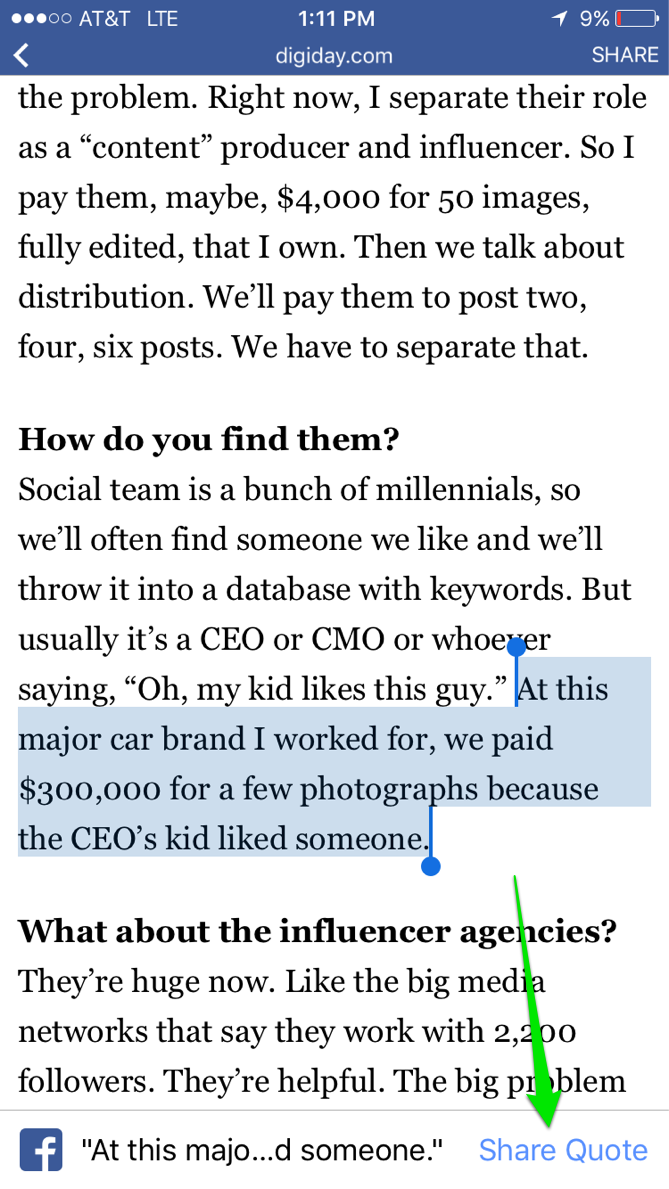
Image: Web page open in Facebook Browser

1. SELECT YOUR TEXT
2. Choose SHARE QUOTE

That shares the page you are on, over on Facebook, with the quoted text.

Looks pretty nice.


Image: Facebook Post with Selected text highlighted

Saturday, November 10, 2012

Boston MBTA Marbleized

Park Street #marblecam

Kendall #mbta #marblecam

Exit #mbta #marblecam

Created with MarbleCam By Daisuke Suzuki on iPhone 5.

"MarbleCam takes pictures that look as if you had focused on a glass marble with a macro lens."

Friday, November 02, 2012

AP Mobile iPhone App Does Social Media Sharing Right


Image: AP Mobile iPhone App Social Media Sharing

Wednesday, August 29, 2007

Do you know Clarence


Do you know Clarence - Originally uploaded on flickr by stevegarfield.

Clarence told me that if you take a photo of someone with the iPhone, and add it to their page in your iPhone address book, it stays there even after you sync up your photos via iPhoto and delte the photos from the iPhone.

I just tried it.

He's right. The photo still remains in the contact record even though you've deleted everything from your 'camera roll' on the iPhone.

That's cool. I was under the impression that you had to send the photo back the iPhone the next time you synced iPhoto with your phone.

Massachusetts Ave with iPhone Google Maps


Massachusetts Ave with iPhone Google Maps - Originally uploaded on flickr by stevegarfield.

Google Maps on the iPhone is great for finding out where you are and how to get where you are going.

Do you know how to get from Downtown Boston to Porter Square by car?

I took Mass Ave and it's actually very easy, but Mass Ave is not the straightest street in the area.

Google maps was great to confirm cross streets along the way.

Monday, August 20, 2007

What do you like most about the Apple iPhone?

AT&T asked me to fill out an online Survey.

Here'e one of my answers:

I like the iPhone because it allows me to be online from anywhere, accessing the web and email, without the need to have my laptop with me.

I also like the automatic sync of my iCal calendar and contacts.

Watching videos is an amazing experience, and the fact that you can watch a video directly form a web page just blows my mind.

The ease of selecting favorites from my phone book is a nice feature as is the keyboard function.

I also love the scrolling built in to the interface for browsing web pages and scanning through email.