Best Beer Bar in Amsterdam: Arendsnest Proeflokaal
Seriously, just go here. Inside, outside, it's all great. Plus, the bar tender will help you choose.

Tuesday, November 17, 2015
Tuesday, November 10, 2015
Massachusetts Health Connector Payment Portal Is Not Amazon.com
I just went through the sign up process for health insurance through the Massachusetts Health Connector. After enrolling, you have to make your first payment to complete the application process. You make a payment on the Payment Portal, a separate system from the enrollment system.
The Massachusetts Health Connector Payment Portal Is Not Amazon.com
There are issues. Many of them can be solved. Most deal with user interface, but the biggest problem is that the Payment Portal is a separate system from the enrollment system.
Massachusetts Health Connector: Enrollment System - BALANCE DUE
On the Massachusetts Health Connector enrollment system, after you place your order for health insurance and are presented with your BALANCE DUE, you have to go to the Payment Portal and enter everything in by hand.

That's not right.
It's a computer system.
Massachusetts Health Connector: PAYMENT PORTAL
Enrollment ID
If you choose to enter in your Enrollment ID, you have to enter it in without the "RefID_" prefix. Why is that even displayed?

Billing Information
Maybe since it's the first time through, the Payment Portal does not know what my balance due is, so you need to key it in to the Pay Other Amount field.
It's not easy. There is a default 00.00 amount there. I went over to the Massachusetts Health Connector and COPIED my amount due, and then tried to PASTE it into the Pay Other Amount field. It didn't work. I ended up re-keying it in.
Next up was Checking Account Number and Bank Routing Number
When you enter numbers into these fields they are hidden from view. You can't see what you are typing. Over to the right you can see the last four digits of the number you typed, after you type it in, but there's no way to turn off the hidden characters.

Give us the option to display what is typed.
Make Another Payment
If you've chosen both a health plan and a dental plan, at this point you want to make another payment.
First off, why can't I pay both dental and health with one payment? Again, it's a computer system that should know how to apply a total amount to individual payments.
Amazon does it with multiple vendors on the same order.
When you Make Another Payment you are back at square one and have to key EVERYTHING back in again. Enrollment ID, Billing Information, email, etc...
It would be nice it all your info was retained and all you had to do was enter in the new PLAN TYPE and AMOUNT.
Conclusion
It would be nice to complete enrollment on the Massachusetts Health Connector, then be able to click to pay the total balance due, having the system distribute the total between Health and Dental.
The Massachusetts Health Connector Payment Portal Is Not Amazon.com
There are issues. Many of them can be solved. Most deal with user interface, but the biggest problem is that the Payment Portal is a separate system from the enrollment system.
Massachusetts Health Connector: Enrollment System - BALANCE DUE
On the Massachusetts Health Connector enrollment system, after you place your order for health insurance and are presented with your BALANCE DUE, you have to go to the Payment Portal and enter everything in by hand.
That's not right.
It's a computer system.
Massachusetts Health Connector: PAYMENT PORTAL
Enrollment ID
If you choose to enter in your Enrollment ID, you have to enter it in without the "RefID_" prefix. Why is that even displayed?
Billing Information
Maybe since it's the first time through, the Payment Portal does not know what my balance due is, so you need to key it in to the Pay Other Amount field.
It's not easy. There is a default 00.00 amount there. I went over to the Massachusetts Health Connector and COPIED my amount due, and then tried to PASTE it into the Pay Other Amount field. It didn't work. I ended up re-keying it in.
Next up was Checking Account Number and Bank Routing Number
When you enter numbers into these fields they are hidden from view. You can't see what you are typing. Over to the right you can see the last four digits of the number you typed, after you type it in, but there's no way to turn off the hidden characters.
Give us the option to display what is typed.
Make Another Payment
If you've chosen both a health plan and a dental plan, at this point you want to make another payment.
First off, why can't I pay both dental and health with one payment? Again, it's a computer system that should know how to apply a total amount to individual payments.
Amazon does it with multiple vendors on the same order.
When you Make Another Payment you are back at square one and have to key EVERYTHING back in again. Enrollment ID, Billing Information, email, etc...
It would be nice it all your info was retained and all you had to do was enter in the new PLAN TYPE and AMOUNT.
Conclusion
It would be nice to complete enrollment on the Massachusetts Health Connector, then be able to click to pay the total balance due, having the system distribute the total between Health and Dental.

Wednesday, October 28, 2015
Boston Globe Links to A Website Online, But Not in the Print Edition
I'm happy to see the Boston Globe linking to a website that's featured in an article.
City Hall unveils StartHub ‘homepage’ for startups, partnering with IBM:

Image: Boston Globe StarHub Article with no link
City Hall unveils StartHub ‘homepage’ for startups, partnering with IBM:
City Hall’s plan to attract and support startups is getting some more firepower.But when the article is printed in the newspaper, it needs to print the URL too, http://www.starthub.org
On Tuesday, Mayor Martin J. Walsh unveiled StartHub, a website designed to serve as a homepage for technology entrepreneurs in Boston.
StartHub will feature information about the city’s technology scene, including a list of incubators and co-working offices, events calendar, industry news, and “a curated stream” of Boston-based companies and investors.
Image: Boston Globe StarHub Article with no link
Monday, October 26, 2015
Blackmagic Pocket Cinema Camera Review
The Blackmagic Pocket Cinema Camera isn't point and shoot. To master it, you've got to explore camera settings beyond today's AUTOmatic world.
Sunday, October 25, 2015
Monday, October 19, 2015
Friday, October 16, 2015
2016 Mercedes-Benz S550 Test Drive
Note:
Photos shot with Samsung #NX1 in AUTO mode.
Buy on Amazon.com (affiliate link):
Disclosure:
Samsung supplied the Samsung NX1 28.2 MP Wireless SMART Mirrorless Digital Camera with 16-50mm f/2.0-2.8 "S" Lens to me on loan to play with and requested a short write-up and/or photos shared with the #NX1 hashtag.

2016 Democratic Presidential Primary Debate - CNN ONLINE FACEBOOK POLL RESULTS are still online
Some sites are reporting that CNN took down their online Facebook poll results from the 2016 Democratic Presidential Primary Debate.
I can't tell if they were taken down at some point, but they are up now.
You can see the 2016 Democratic Presidential Primary - CNN FACEBOOK POLL RESULTS here: http://cnn.com/vote.

Image: 2016 Democratic Presidential Primary Debate - CNN FACEBOOK POLL RESULTS Courtesy CNN
When I was watching the debate, I was looking for the Facebook integration. All I saw was the hashtag #DEMDEBATE, and followed it on twitter.
I had no idea that I was supposed to go to the CNN Facebook page to interact in real time. Did they publicize that?
Did you know?
Did you vote in the 2016 Democratic Presidential Primary Debate - CNN ONLINE FACEBOOK POLL?
UPDATE:
Sorry, Bernie fans: The polls are coming in, and it looks like Clinton won the debate
I can't tell if they were taken down at some point, but they are up now.
You can see the 2016 Democratic Presidential Primary - CNN FACEBOOK POLL RESULTS here: http://cnn.com/vote.
Image: 2016 Democratic Presidential Primary Debate - CNN FACEBOOK POLL RESULTS Courtesy CNN
When I was watching the debate, I was looking for the Facebook integration. All I saw was the hashtag #DEMDEBATE, and followed it on twitter.
I had no idea that I was supposed to go to the CNN Facebook page to interact in real time. Did they publicize that?
Did you know?
Did you vote in the 2016 Democratic Presidential Primary Debate - CNN ONLINE FACEBOOK POLL?
UPDATE:
Sorry, Bernie fans: The polls are coming in, and it looks like Clinton won the debate
Monday, October 12, 2015
BAA Half Marathon - Boston
Note: Photos shot with Samsung #NX1 in AUTO mode. Buy on Amazon.com (affiliate link):
Disclosure:
Samsung supplied the Samsung NX1 28.2 MP Wireless SMART Mirrorless Digital Camera with 16-50mm f/2.0-2.8 "S" Lens to me on loan to play with and requested a short write-up and/or photos shared with the #NX1 hashtag.
Friday, October 09, 2015
How to Upload a Video on Twitter.com
How to upload a video to twitter from a browser.
GO TO twitter.com
CLICK TWEET
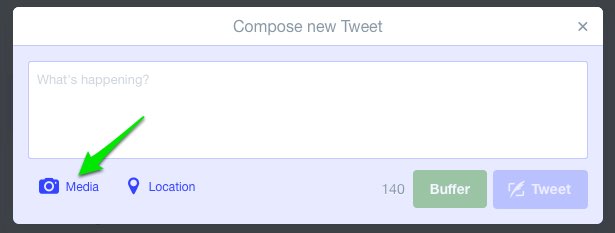
CLICK MEDIA
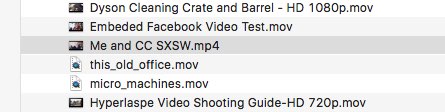
SELECT A VIDEO
More details about formats, from the twitter blog:
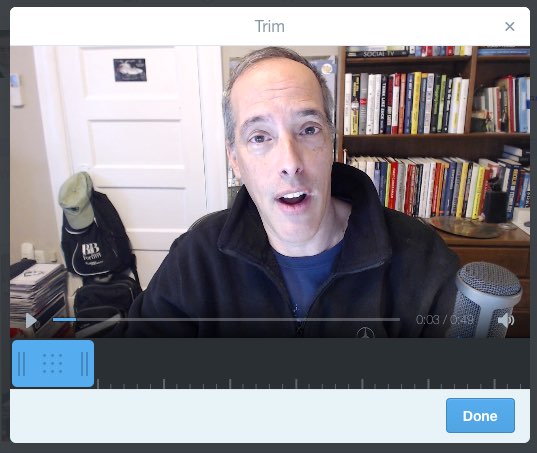
TRIM
Now you will be presented with the video in a window that lets you trim the length to 30 seconds or less.
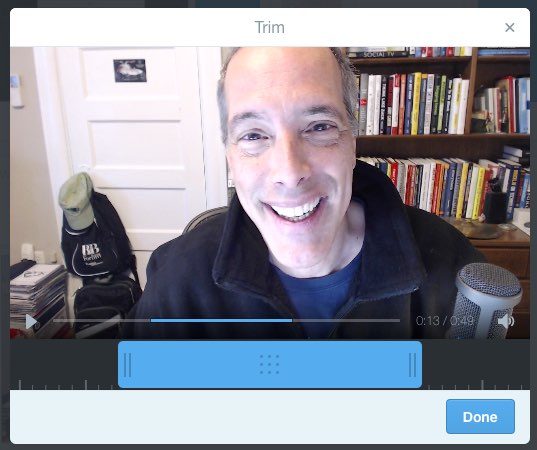
CLICK DONE
COMPOSE
Add any text to your tweet.
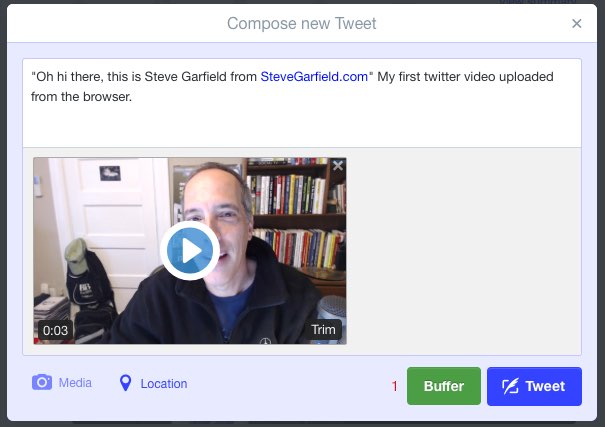
CLICK TWEET
Click TWEET to share it. After you do that, you'll see a progress indicator showing that your video is uploading.

Then you'll see it processing.
HERE IS THE EMBEDDED TWEET WITH MEDIA INCLUDED:
You can also embed the media only:
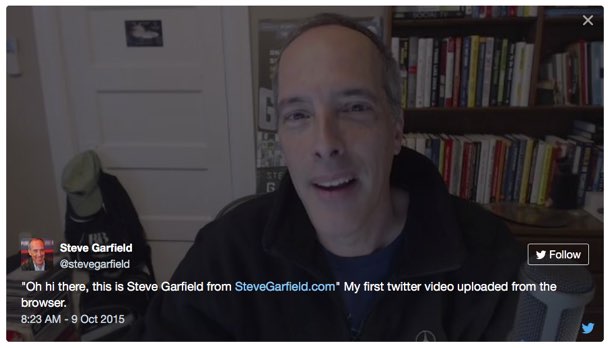
Note that a link back to the user and the tweet is embedded into the video for credit.
Click the user name and you go to the user's tweet stream. Click the twitter icon and you see the original tweet.
GO TO twitter.com
CLICK TWEET
CLICK MEDIA
SELECT A VIDEO
More details about formats, from the twitter blog:
What video formats do you support?
We currently support MP4 and MOV video formats on mobile apps.
On the web, we support the MP4 video format with H264 format with AAC audio. You can upload videos up to 512MB, however you will be prompted to edit videos to 30 seconds or less in length.
What are the limitations on video resolutions and aspect ratios that can be uploaded on the web?
Minimum resolution: 32 x 32
Maximum resolution: 1920 x 1200 (and 1200 x 1900)
Aspect ratios: 1:2.39 - 2.39:1 range (inclusive)
Maximum frame rate: 40 fps
Maximum bitrate: 25 Mbps
TRIM
Now you will be presented with the video in a window that lets you trim the length to 30 seconds or less.
CLICK DONE
COMPOSE
Add any text to your tweet.
CLICK TWEET
Click TWEET to share it. After you do that, you'll see a progress indicator showing that your video is uploading.
Then you'll see it processing.
HERE IS THE EMBEDDED TWEET WITH MEDIA INCLUDED:
"Oh hi there, this is Steve Garfield from http://t.co/y2xpPUPSyz" My first twitter video uploaded from the browser. pic.twitter.com/atljU89lDQ
— Steve Garfield (@stevegarfield) October 9, 2015You can also embed the media only:
"Oh hi there, this is Steve Garfield from http://t.co/y2xpPUPSyz" My first twitter video uploaded from the browser. pic.twitter.com/atljU89lDQ
— Steve Garfield (@stevegarfield) October 9, 2015Note that a link back to the user and the tweet is embedded into the video for credit.
Click the user name and you go to the user's tweet stream. Click the twitter icon and you see the original tweet.
Thursday, October 08, 2015
KitchenAid Siphon Coffee Brewer Puts on a Show
Note: Photos shot with Samsung #NX1 in AUTO mode.
Buy on Amazon.com (affiliate link):
Disclosure:
Samsung supplied the Samsung NX1 28.2 MP Wireless SMART Mirrorless Digital Camera with 16-50mm f/2.0-2.8 "S" Lens to me on loan to play with and requested a short write-up and/or photos shared with the #NX1 hashtag.
Thursday, October 01, 2015
Tuesday, September 22, 2015
Friday, September 18, 2015
Day Trip to Martha's Vineyard
Note: Video shot with Samsung #NX1 in AUTO mode. Buy on Amazon.com (affiliate link):
Disclosure:
Samsung supplied the Samsung NX1 28.2 MP Wireless SMART Mirrorless Digital Camera with 16-50mm f/2.0-2.8 "S" Lens to me on loan to play with and requested a short write-up and/or photos shared with the #NX1 hashtag.
Saturday, September 12, 2015
Tuesday, September 08, 2015
Here are my tips on choosing sessions for #INBOUND15, with my picks.
Guest Post on the INBOUND blog: 5 WAYS TO SELECT SESSIONS FOR INBOUND 2015.

With over 250 speakers at INBOUND 2015, it's going to be difficult to choose which sessions to go to. There are many different ways to decide on which speakers to see. Here are five I've found helpful at the hundreds of events I've attended.
Monday, September 07, 2015
REVIEW Wine for a Wedding handcrafted & personalized wine box gift
Note: Photos shot with Samsung #NX1 in AUTO mode. Buy on Amazon.com (affiliate link):
Disclosure:
Samsung supplied the Samsung NX1 28.2 MP Wireless SMART Mirrorless Digital Camera with 16-50mm f/2.0-2.8 "S" Lens to me on loan to play with and requested a short write-up and/or photos shared with the #NX1 hashtag.
Wednesday, August 26, 2015
Greenway Water Feature
Note: Photos shot with Samsung #NX1 in AUTO mode. Buy on Amazon.com (affiliate link):
Disclosure: Samsung supplied the Samsung NX1 28.2 MP Wireless SMART Mirrorless Digital Camera with 16-50mm f/2.0-2.8 "S" Lens to me on loan to play with and requested a short write-up and/or photos shared with the #NX1 hashtag.
Boston Public Market
Note: Photos shot with Samsung #NX1 in AUTO mode. Buy on Amazon.com (affiliate link):
Disclosure: Samsung supplied the Samsung NX1 28.2 MP Wireless SMART Mirrorless Digital Camera with 16-50mm f/2.0-2.8 "S" Lens to me on loan to play with and requested a short write-up and/or photos shared with the #NX1 hashtag.
Tuesday, August 25, 2015
Samsung NX1 Touch Focus on Samsung Smart Camera App
This is a great feature that lets you use touch focus on an Android or iOS smartphone, using the Samsung Smart Camera App, to focus the NX1 remotely over the camera's WiFi. It's great for one person shoots where you are the only one shooting video and being on camera talent.
Note: Video shot with Samsung #NX1 in AUTO mode. Buy on Amazon.com (affiliate link):
Disclosure: Samsung supplied the Samsung NX1 28.2 MP Wireless SMART Mirrorless Digital Camera with 16-50mm f/2.0-2.8 "S" Lens to me on loan to play with and requested a short write-up and/or photos shared with the #NX1 hashtag.
Note: Video shot with Samsung #NX1 in AUTO mode. Buy on Amazon.com (affiliate link):
Disclosure: Samsung supplied the Samsung NX1 28.2 MP Wireless SMART Mirrorless Digital Camera with 16-50mm f/2.0-2.8 "S" Lens to me on loan to play with and requested a short write-up and/or photos shared with the #NX1 hashtag.
Subscribe to:
Posts (Atom)