

Wednesday, January 28, 2015
How to grab your video from Hang With
I'm testing out Hang With for Live Streaming from my iPhone.
Here's how to grab the EMBED code:
Go to your video page. Here's an example page.
When looking at the video page, there's also a way to get the EMBED code.
It's there in the upper LEFT, seen as "<>"
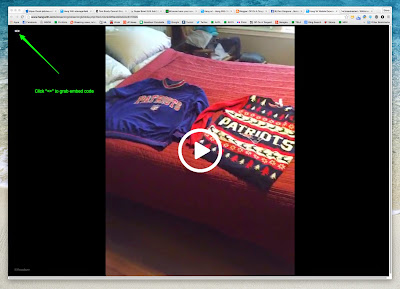
Here's my EMBEDED video (NOTE - Still testing, may not play):
TEST #2:
Support also gave me these three ways to grab Hang With video.
Here's how to grab the EMBED code:
Go to your video page. Here's an example page.
When looking at the video page, there's also a way to get the EMBED code.
It's there in the upper LEFT, seen as "<>"

Here's my EMBEDED video (NOTE - Still testing, may not play):
TEST #2:
Support also gave me these three ways to grab Hang With video.
There are currently three options for you to grab your video:I'm going to test that widget at SteveGarfield.tv.
Download Video #1 - If you login and go to your profile you can click "Download" next to the share buttons.
Download Video #2 - Head to www.hangwith.com/export and then login to your account. At that point you will see all of you recent broadcasts and have the ability to download it.
Grab your Web Widget - Each user also has the ability to create their own unique "web widget". This widget allows users to embed their most recent 5 broadcasts on their website (as well as allow people to watch them live). You can find out more at www.hangwith.com/widget (please note you need at least 5 broadcasts to generate your widget).

Tuesday, January 27, 2015
Friday, January 23, 2015
Carol and Steve Show: Livestreaming with Hang w/
I'm testing out a new iOS live streaming App called Hang w/.
Oh wait, it doesn't support landscape mode.

Go Pats!
Chat allows viewers to type text to the screen. You can respond by speaking. There's no ability to text chat back. I ended up chatting on Facebook and Messenger.

Looks good when the camera is held steady.

This shot reminds me of the old Carol and Steve Show.

Saved videos are embeddable, but the embed code gives me DIV error, so here a link.
Oh wait, it doesn't support landscape mode.

Go Pats!
Chat allows viewers to type text to the screen. You can respond by speaking. There's no ability to text chat back. I ended up chatting on Facebook and Messenger.

Looks good when the camera is held steady.

This shot reminds me of the old Carol and Steve Show.

Saved videos are embeddable, but the embed code gives me DIV error, so here a link.
Thursday, January 22, 2015
We're going to the Super Bowl as guests of GMC
We're going to the Super Bowl as guests of GMC. Disclosure: All air, hotel, meals, and entertainment will be covered by GMC.
Woo Hoo!

Play, Fun, and Surprise
I love it when a plan comes together. My three words for 2015 are Play, Fun, and Surprise. In my New Year's resolution post, I put it out there that Carol and I would be interested in traveling more and sharing our experiences via social media in real time.
Well, that's what GMC was looking for when they selected us to take this trip. I think it also helped that I'm a big Patriots and auto fan, having reviewed GM cars in the past. ;-)

Photo: Wearing Six Shirts During the Playoffs!
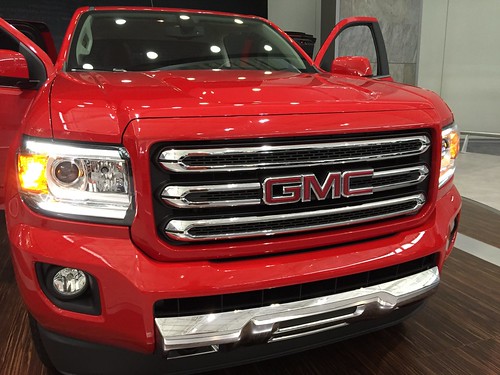
Photo: Sharing GMC truck photos from the Boston Auto Show.
Join us on the trip
It's all Karma. I love to tell stories, share experiences in real time, and have a conversation as I go. Part of the fun of this connected world is that you can join in on our trips, and comment as we go, and offer suggestions.
So join us on social media as we travel to Phoenix for the Super Bowl.
You can Follow us and interact on twitter, @stevegarfield and @carolgarfield.
I'm on Facebook here and Instagram here.
I made up a twitter list of all the participants.
Sharing the content with a hashtag
I'll be sharing my content with the hashtag #VIPwithGMC as a disclosure. Jenni Hogan, chief media officer of Tagboard, and our host, has set up a tagboard to aggregate twitter and Instagram content: https://tagboard.com/VIPwithGMC/

Jenni got a head start on me, by asking people to tweet out and post Instagram photos of themselves in Seahawks gear, so if you are interested in helping to make this page look better, tweet out and post Instagram photos of youself in Patriots gear with the hashtag #VIPwithGMC.
Our Schedule
FRIDAY
PepsiCo Party featuring Zac Brown
SATURDAY
NFL EXPERIENCE ENGINEERED BY GMC
The National Football League will host the NFL Experience at the Phoenix Convention Center from January 24 - February 1, 2015. The NFL Experience Engineered by GMC is one of the most exciting continuous event surrounding Super Bowl XLIX – pro football’s interactive theme park offering participatory games, displays, entertainment attractions, youth football clinics and free autograph sessions from NFL players.
NFL Experience Attractions
Bud Light #upforwhatever party. I'm up for whatever.
SUNDAY
Super Bowl Official NFL Tailgate
Super Bowl XLIX, Kickoff at 4:30 pm (MST)
MONDAY
MVP Press Conference
Our trip out to Phoenix and our first day.
Woo Hoo!
Play, Fun, and Surprise
I love it when a plan comes together. My three words for 2015 are Play, Fun, and Surprise. In my New Year's resolution post, I put it out there that Carol and I would be interested in traveling more and sharing our experiences via social media in real time.
Well, that's what GMC was looking for when they selected us to take this trip. I think it also helped that I'm a big Patriots and auto fan, having reviewed GM cars in the past. ;-)

Photo: Wearing Six Shirts During the Playoffs!
Photo: Sharing GMC truck photos from the Boston Auto Show.
Join us on the trip
It's all Karma. I love to tell stories, share experiences in real time, and have a conversation as I go. Part of the fun of this connected world is that you can join in on our trips, and comment as we go, and offer suggestions.
So join us on social media as we travel to Phoenix for the Super Bowl.
You can Follow us and interact on twitter, @stevegarfield and @carolgarfield.
I'm on Facebook here and Instagram here.
I made up a twitter list of all the participants.
Sharing the content with a hashtag
I'll be sharing my content with the hashtag #VIPwithGMC as a disclosure. Jenni Hogan, chief media officer of Tagboard, and our host, has set up a tagboard to aggregate twitter and Instagram content: https://tagboard.com/VIPwithGMC/

Jenni got a head start on me, by asking people to tweet out and post Instagram photos of themselves in Seahawks gear, so if you are interested in helping to make this page look better, tweet out and post Instagram photos of youself in Patriots gear with the hashtag #VIPwithGMC.
Let's go Patriots! pic.twitter.com/m3KV2DVQu3
— Steve Garfield (@stevegarfield) January 18, 2015Our Schedule
FRIDAY
PepsiCo Party featuring Zac Brown
SATURDAY
NFL EXPERIENCE ENGINEERED BY GMC
The National Football League will host the NFL Experience at the Phoenix Convention Center from January 24 - February 1, 2015. The NFL Experience Engineered by GMC is one of the most exciting continuous event surrounding Super Bowl XLIX – pro football’s interactive theme park offering participatory games, displays, entertainment attractions, youth football clinics and free autograph sessions from NFL players.
NFL Experience Attractions
Bud Light #upforwhatever party. I'm up for whatever.
SUNDAY
Super Bowl Official NFL Tailgate
Super Bowl XLIX, Kickoff at 4:30 pm (MST)
MONDAY
MVP Press Conference
Our trip out to Phoenix and our first day.
Monday, January 19, 2015
Wednesday, January 07, 2015
Parmesan & Thyme Crackers
I was inspired to make some home made crackers after watching The Great British Bake Off.
One of the tests was to make biscuits. We call them crackers. I'd never thought about it before, but wanted to try it.
So I searched and found a recipe for Parmesan & Thyme Crackers.
When I made it, the dough came out too crumbly, so I aded one egg. That fixed it up.
Modified version of Blooming on Bainbridge's modified version of Barefoot Contessa's Parmesan & Thyme Crackers
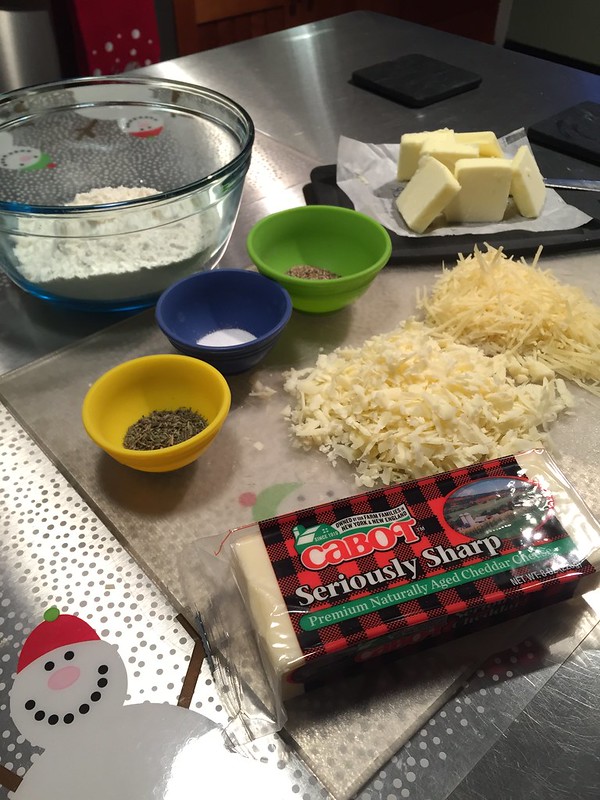
Ingredients:
1/2 cup (1 stick) butter at room temperature
2 ounces freshly grated Whole Foods Parmesan cheese
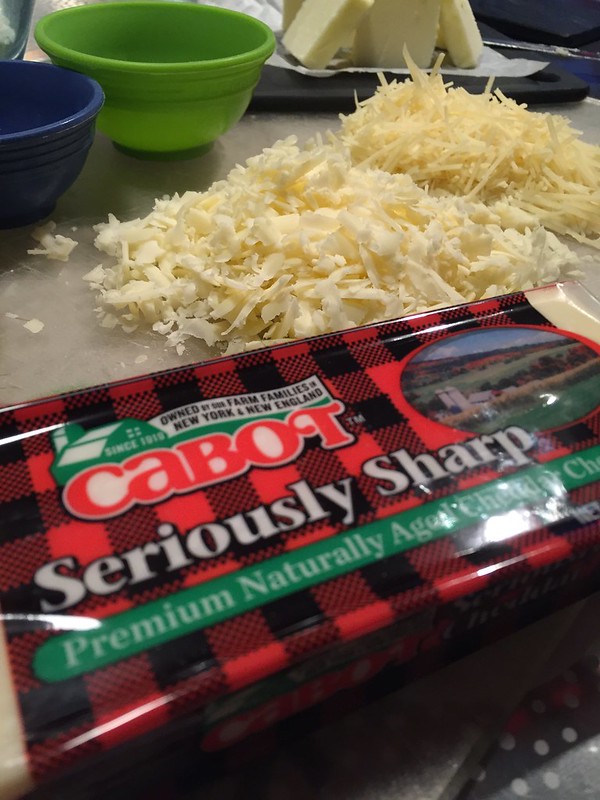
2 ounces freshly grated Cabot Extra Sharp Cheddar cheese
1 teaspoon thyme
1/2 teaspoon salt
1/2 teaspoon freshly ground black pepper
1 1/4 cup all-purpose flour
1 teaspoon water
1 egg
coarse sea salt for sprinkling
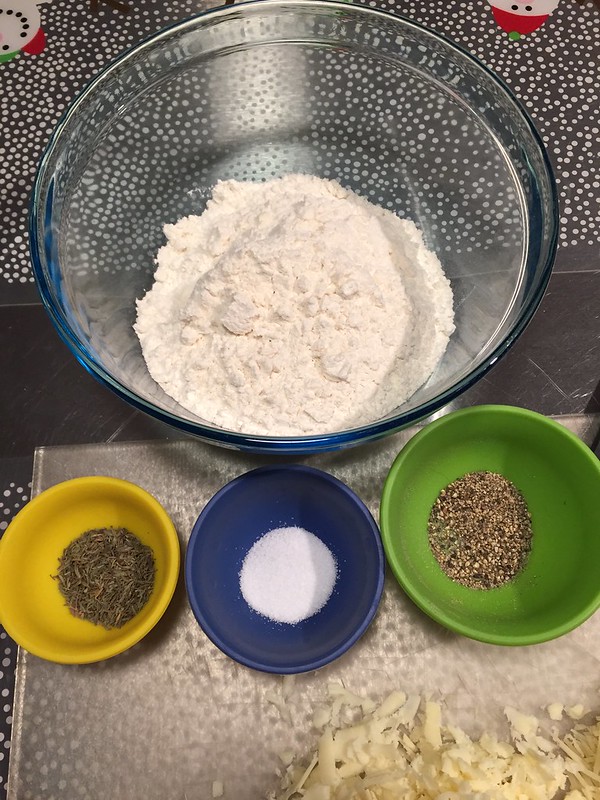
Steps:
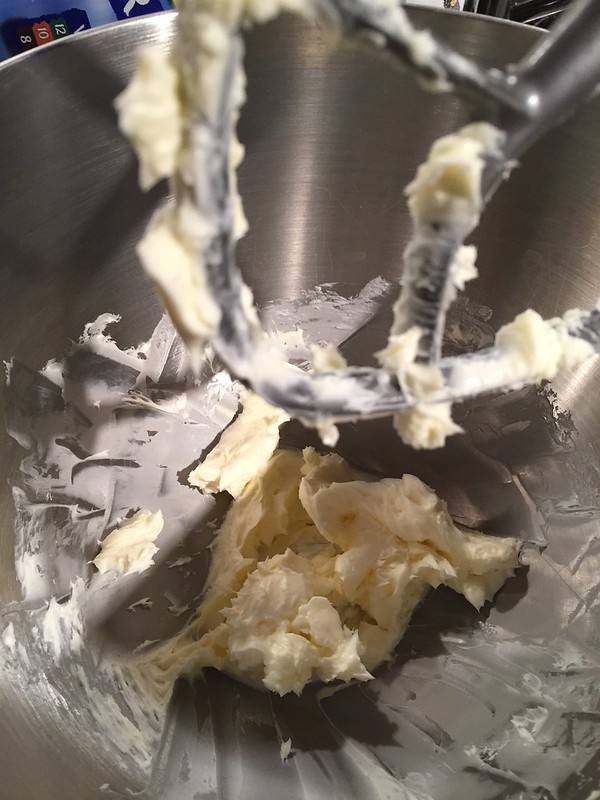
Cream butter.
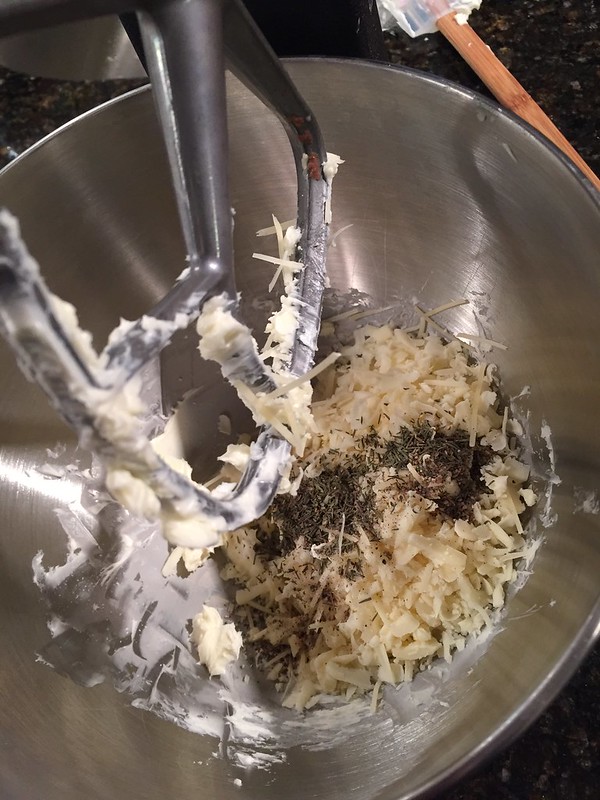
Add grated cheese, thyme, salt and pepper to butter.
Add flour, water and egg.
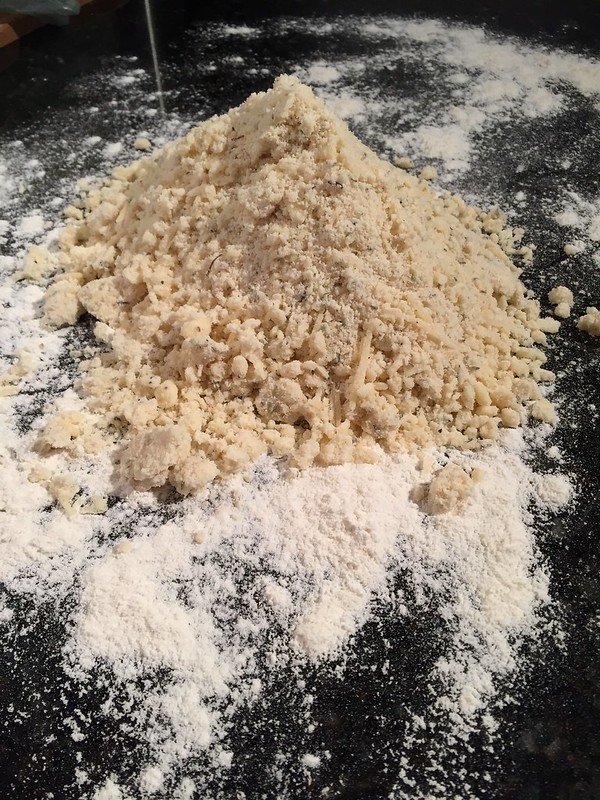
Dump crumbly flour mixture onto floured surface.

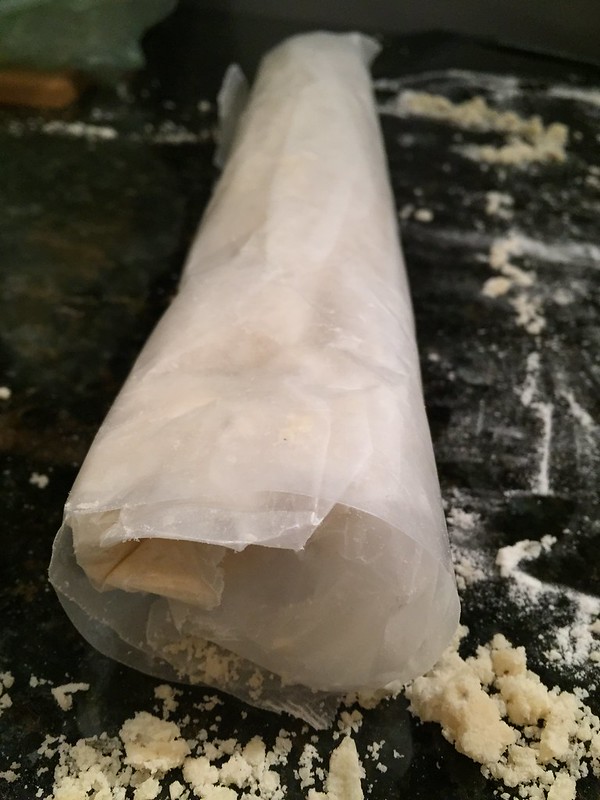
Form into a log, wrap in wax paper and refrigerate for one hour.
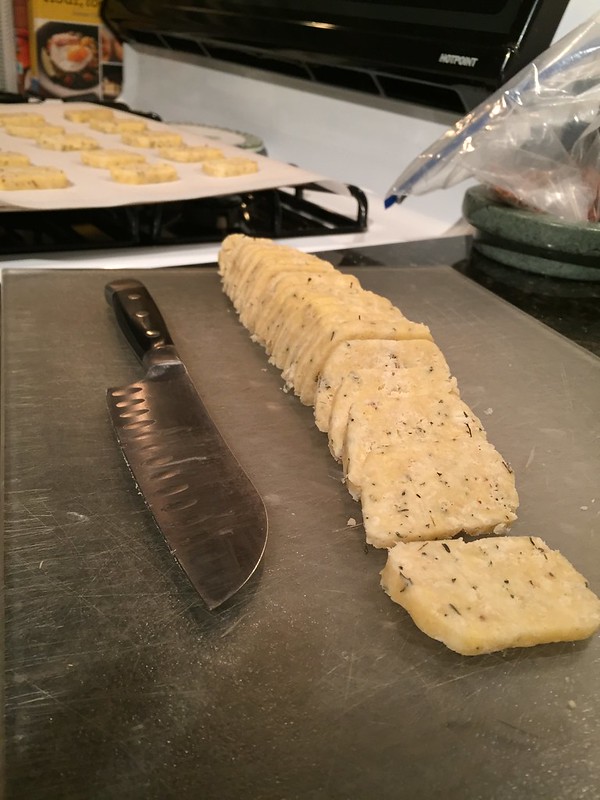
Remove and cut into circles, or if you can't make circles, rectangular-like shapes. ;-)
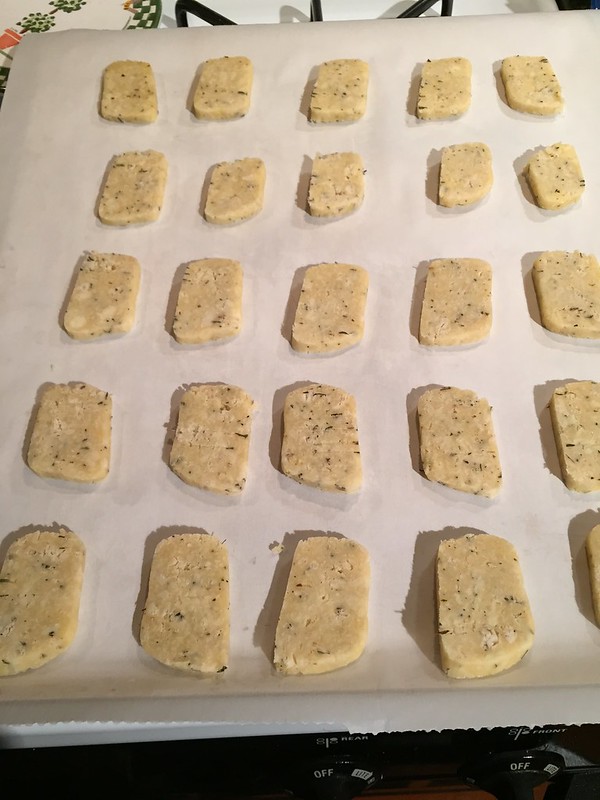
Bake at 350 for 22 minutes on cookie sheet lined with parchment paper.
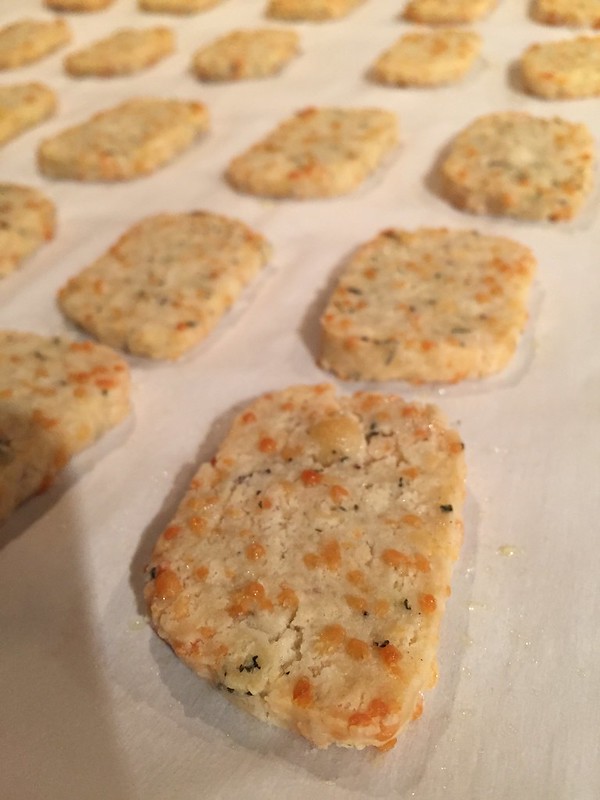
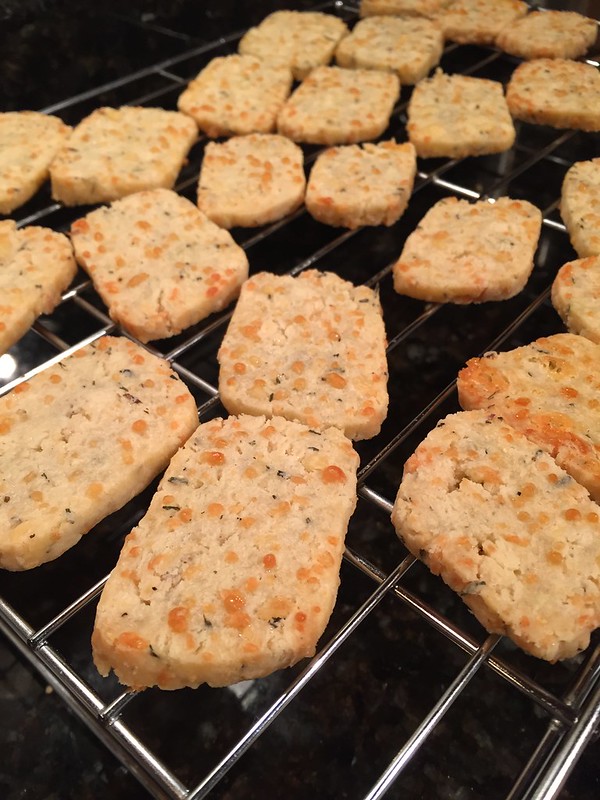
Cool on wire rack.
YUM!
One of the tests was to make biscuits. We call them crackers. I'd never thought about it before, but wanted to try it.
So I searched and found a recipe for Parmesan & Thyme Crackers.
When I made it, the dough came out too crumbly, so I aded one egg. That fixed it up.
Modified version of Blooming on Bainbridge's modified version of Barefoot Contessa's Parmesan & Thyme Crackers
Ingredients:
1/2 cup (1 stick) butter at room temperature
2 ounces freshly grated Whole Foods Parmesan cheese
2 ounces freshly grated Cabot Extra Sharp Cheddar cheese
1 teaspoon thyme
1/2 teaspoon salt
1/2 teaspoon freshly ground black pepper
1 1/4 cup all-purpose flour
1 teaspoon water
1 egg
coarse sea salt for sprinkling
Steps:
Cream butter.
Add grated cheese, thyme, salt and pepper to butter.
Add flour, water and egg.
Dump crumbly flour mixture onto floured surface.
Form into a log, wrap in wax paper and refrigerate for one hour.
Remove and cut into circles, or if you can't make circles, rectangular-like shapes. ;-)
Bake at 350 for 22 minutes on cookie sheet lined with parchment paper.
Cool on wire rack.
YUM!
Dropcam discontinued support for Dropcam Original.
UPDATE: 1/26/15
Wow. A change of heart.

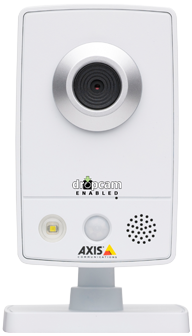
Dropcam discontinued support for Dropcam Original. You can’t change WiFi network names.

NEST Support Email
That’s the worst customer support.
When you go to the page to change WiFi network name you get this:
Why can't they keep a webpage up for existing users?
It still works with a wired connection:
Will now have to look into something new.
Maybe Butterflyeye?


Only Butterfleye Streams and Records - Wirelessly
Never compromise because of cords. With two-weeks of battery life, you will never miss a moment with Butterfleye. Full HD live-streaming combined with the flexibility to place your Butterfleye anywhere.
Video as a Sensor
Every monitoring camera owner knows that those annoying notifications are a waste of your time. Only Butterfleye combines superior on-board sensors, video analytics, and processing power to deliver notifications you want. Not annoyances you don't.
Free Cloud Storage
For those moments that matter, we provide one free day of rolling cloud storage so that you never miss a moment. Never get nickel and dimed - that day is yours for life.
Wow. A change of heart.
Starting April 15th, original Dropcam cameras will stop working. But to make sure your service isn’t disrupted – and to show our eternal thanks for your ongoing support – we’re offering you a free Dropcam that can take advantage of all the great things we have planned.
Dropcam discontinued support for Dropcam Original. You can’t change WiFi network names.
NEST Support Email
That’s the worst customer support.
When you go to the page to change WiFi network name you get this:
Internal Server ErrorIt's only a network name.
The server encountered an internal error and was unable to complete your request. Either the server is overloaded or there is an error in the application.
Why can't they keep a webpage up for existing users?
It still works with a wired connection:
Will now have to look into something new.
Maybe Butterflyeye?
Only Butterfleye Streams and Records - Wirelessly
Never compromise because of cords. With two-weeks of battery life, you will never miss a moment with Butterfleye. Full HD live-streaming combined with the flexibility to place your Butterfleye anywhere.
Video as a Sensor
Every monitoring camera owner knows that those annoying notifications are a waste of your time. Only Butterfleye combines superior on-board sensors, video analytics, and processing power to deliver notifications you want. Not annoyances you don't.
Free Cloud Storage
For those moments that matter, we provide one free day of rolling cloud storage so that you never miss a moment. Never get nickel and dimed - that day is yours for life.
Tuesday, January 06, 2015
Apple Store: iPhone Apple Pay Self-Checkout
When you are in an Apple Store you can use your iPhone to scan in a bar code and use Apple Pay to self-cehckout.
Wow.
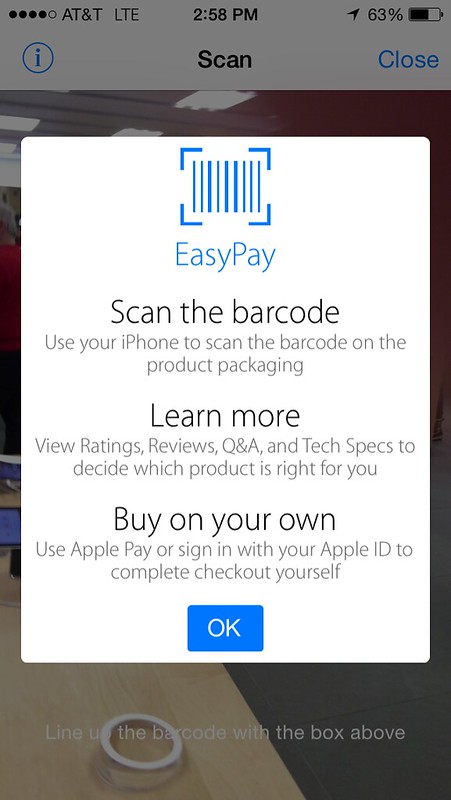
I thought this was great, so I scanned in a keyboard that I was considering buying.
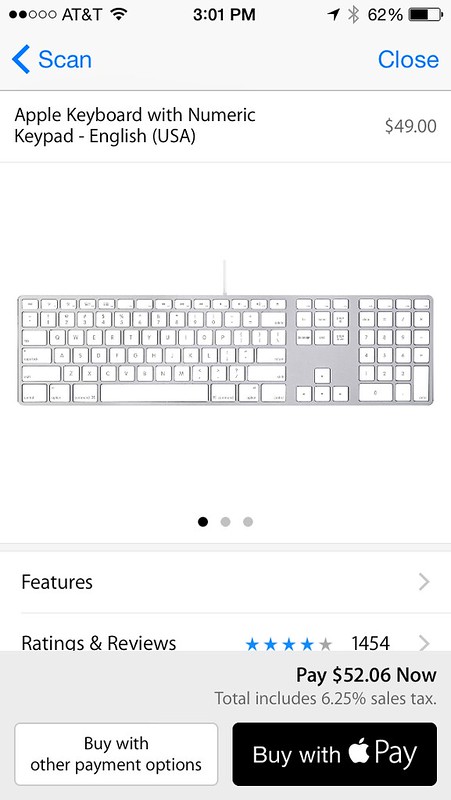
I was ready to buy with Apple Pay, but then I clicked on the reviews.
And they were bad.
So I didn't buy the keyboard.
But I still think this is cool.
Wow.
I thought this was great, so I scanned in a keyboard that I was considering buying.
I was ready to buy with Apple Pay, but then I clicked on the reviews.
And they were bad.
So I didn't buy the keyboard.
But I still think this is cool.
Wednesday, December 31, 2014
My Three Words for 2015: PLAY, FUN, and SURPRISE
I've been doing Chris Brogan's THREE WORDS exercise for New Years for a while now. What's ended up working for me is keeping the same words year to year.
It's become my mantra.
These three words help me focus on what's important to me.
Here they are:

PLAY
Back in my Three Words for 2013 post, I talked about how PLAY has worked for me in travel and food blogging.
I expressed an interest in working with high end resorts that are looking to share their story in a personal way via social media. The best example from 2014 was attending the grand opening of The Hermitage ski resort in Vermont.
My wife and I had a great time, I shared content via social media while there in real time, and then compiled everything in a Storify blog post. We hope to do lots more travel this year. Let me know if you want me to help you tell your story.
FUN
I only choose to work with people who are fun. I enjoy helping fun people and companies grow. I'm good at saying NO. If a project isn't going to be fun, I won't do it. ;-)
I also made more time for leisure fun in 2014. For 2015 that's going to mean getting better at tennis, and taking up golf again.
SURPRISE
Ze Frank talks about:
- Trying New Things.
- Being uncomfortable.
- Breaking patterns.
In 2014 I ramped up my angel investing and got involved in some new companies. I'm enjoying the start up process, advising Mercedes-Benz of Burlington, and Lord Hobo Brewing Company. There are a couple of other new startups that I'll be working with in 2015, and it'll be fun to explore and learn with them.
HINT: One company is working in the virtual reality space.
Do you choose three words to start the year? I'd love to hear them.
It's become my mantra.
These three words help me focus on what's important to me.
Here they are:
PLAY
Back in my Three Words for 2013 post, I talked about how PLAY has worked for me in travel and food blogging.
I expressed an interest in working with high end resorts that are looking to share their story in a personal way via social media. The best example from 2014 was attending the grand opening of The Hermitage ski resort in Vermont.
My wife and I had a great time, I shared content via social media while there in real time, and then compiled everything in a Storify blog post. We hope to do lots more travel this year. Let me know if you want me to help you tell your story.
FUN
I only choose to work with people who are fun. I enjoy helping fun people and companies grow. I'm good at saying NO. If a project isn't going to be fun, I won't do it. ;-)
I also made more time for leisure fun in 2014. For 2015 that's going to mean getting better at tennis, and taking up golf again.
SURPRISE
Ze Frank talks about:
- Trying New Things.
- Being uncomfortable.
- Breaking patterns.
In 2014 I ramped up my angel investing and got involved in some new companies. I'm enjoying the start up process, advising Mercedes-Benz of Burlington, and Lord Hobo Brewing Company. There are a couple of other new startups that I'll be working with in 2015, and it'll be fun to explore and learn with them.
HINT: One company is working in the virtual reality space.
Do you choose three words to start the year? I'd love to hear them.
Friday, December 26, 2014

Three Movies To Watch: Winter's Tale, Divergent, Snowpiercer
Winter's Tale - The horse in this movie is called 'Horse.'
I enjoyed watching Colin Farrell and Jessica Brown Findlay in this love story across time.
Divergent - You can't be expected to know what you want to do with your life when in College.
I expected this to be a rip off of The Hunger Games, but the story kept my interest throughout, and I'm looking forward to the next one in the series.
The Aptitude Test.
Snowpiercer - It would have been easier to buy a First Class ticket.
I heard extreme mixed reviews on this one, from LOVE to HATE. I loved it. Especially seeing all the different classes of train cars.
I enjoyed watching Colin Farrell and Jessica Brown Findlay in this love story across time.
Divergent - You can't be expected to know what you want to do with your life when in College.
I expected this to be a rip off of The Hunger Games, but the story kept my interest throughout, and I'm looking forward to the next one in the series.
The Aptitude Test.
Snowpiercer - It would have been easier to buy a First Class ticket.
I heard extreme mixed reviews on this one, from LOVE to HATE. I loved it. Especially seeing all the different classes of train cars.
Saturday, December 20, 2014
How to Fix: Comcast Xfinity TV Go Video Loading Adobe Flash Problem
It's cool that you can watch live video via Xfinity TV Go, but sometimes the videos don't play, and you're stuck on a VIDEO LOADING page.
You might have brought this on yourself by changing a setting in Google Chrome that keeps videos from automatically playing.
You thought it was a good idea at the time, because it sped up the browser, but then when you wanted to watch some live video, you had NO IDEA how to make it work.
I went over to the ADOBE web site, looked around at a message board where a lot of people were complaining, some even saying to DELETE Chrome and reinstall.
Well, sometimes that works, and in this case it probably would, by resetting all the settings, but I figured out how to get videos to play again on Xfinity TV Go, but just changing one setting in my browser settings...
Hope this can work for you.
Here's how I did it.
Here you are seeing 'LOADING VIDEO...'
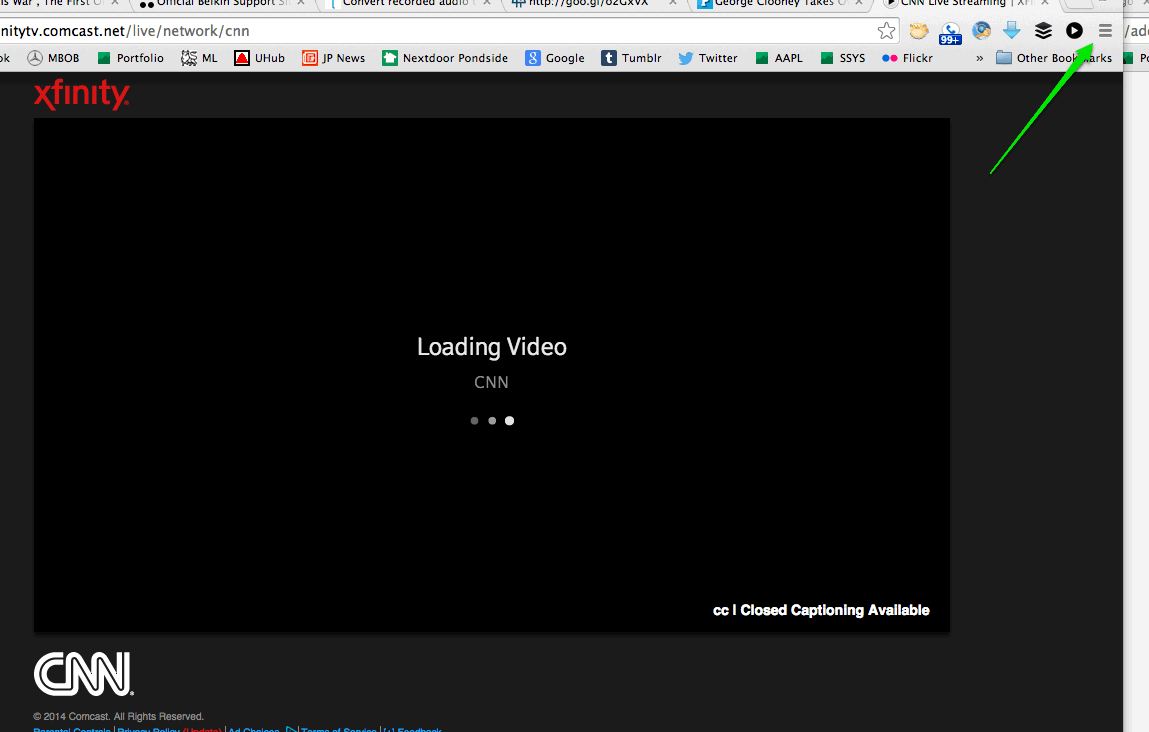
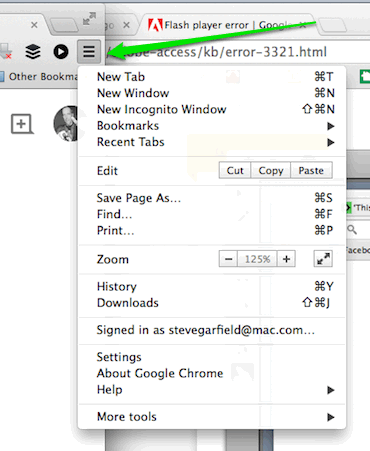
CLICK THE 'TOP RIGHT MENU ICON'
SELECT 'SETTINGS'
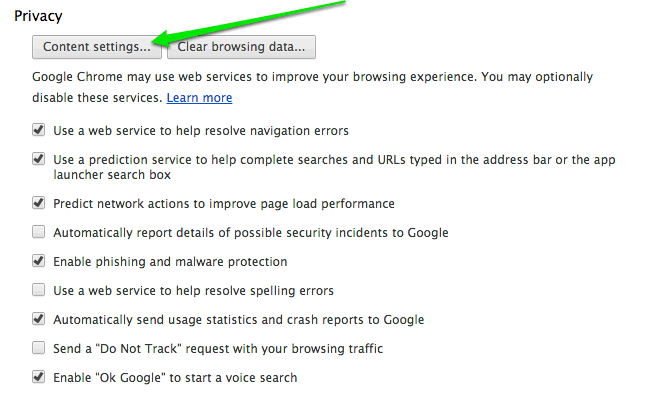
UNDER PRIVACY
CLICK 'CONTENT SETTINGS'
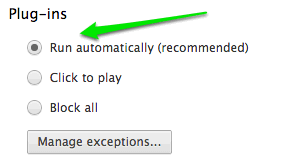
UNDER PLUGINS
CLICK 'RUN AUTOMATICALLY'
You might have brought this on yourself by changing a setting in Google Chrome that keeps videos from automatically playing.
You thought it was a good idea at the time, because it sped up the browser, but then when you wanted to watch some live video, you had NO IDEA how to make it work.
I went over to the ADOBE web site, looked around at a message board where a lot of people were complaining, some even saying to DELETE Chrome and reinstall.
Well, sometimes that works, and in this case it probably would, by resetting all the settings, but I figured out how to get videos to play again on Xfinity TV Go, but just changing one setting in my browser settings...
Hope this can work for you.
Here's how I did it.
Here you are seeing 'LOADING VIDEO...'
CLICK THE 'TOP RIGHT MENU ICON'
SELECT 'SETTINGS'
UNDER PRIVACY
CLICK 'CONTENT SETTINGS'
UNDER PLUGINS
CLICK 'RUN AUTOMATICALLY'
Friday, December 19, 2014
New Xfinity Wireless Gateway Dual Band 802.11 AC Installed

I just got a new New Xfinity Wireless Gateway Dual Band 802.11 AC Installed (DPC3941T).
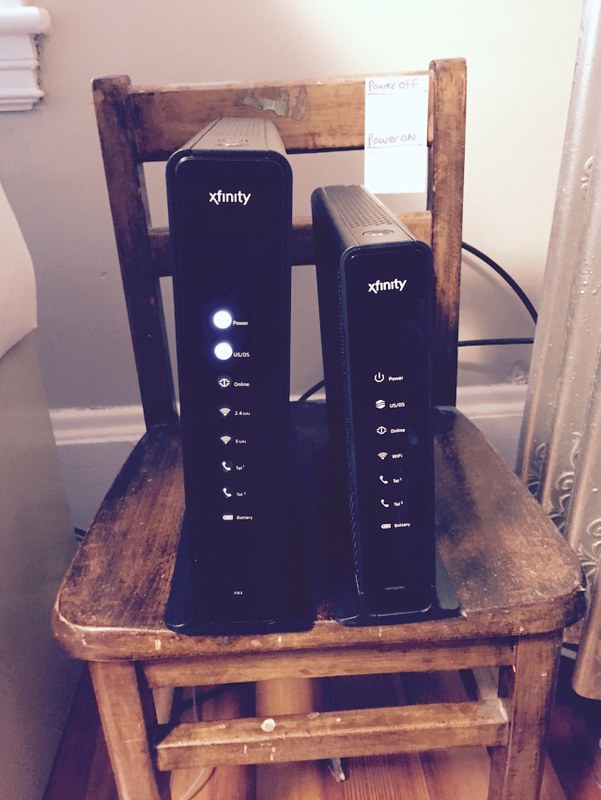
New vs. Old
According to Multichannel news, The new DOCSIS 3.0-powered and voice-capable Xfinity Wireless Gateway is a dual-band 802.11n router with 2.4 GHz and 5.0 GHz radios designed to expand wireless coverage in the home and help customers connect their tablets, smartphones, gaming consoles and PCs to the home network.
To get the higher speed, you need to have a device that is capable of connecting to the faster band. Some older devices won't be able to. For a laptop, you can get a Dual Band 802.11n USB Adapter, that will allow you to connect to the 5.0 band.
Here are the results of a Comcast Speed Test:
Wired:

Wireless:

It seems like it's going to cover a farther range from my upstairs office. I'll be watching it's performance to see how the connectivity is downstairs.
2.5 GHz Band is crowded, 5 GHz band isn't
I used WiFi Explorer to take a look at EiFi networks that are around me. The 2.5 GHz Band is crowded, the 5 GHz band isn't. The Xfinity tech told me that the crowded band is like the old wireless home phones where you had to pick a channel. Sometimes you'd hear your neighbor's calls, or have conflicts with their phone.
That's what's happening with the 2.5 GHz WiFi band. It's getting crowded. So crowded in fact, that it can become almost unuasable when there are lots of devices in the same area.
Here's my quiet neighborhood's 2.5 GHz WiFi band.

Here's my quiet neighborhood's 5.0 GHz WiFi band.

A lot less crowded.
And yes, I named my Xfinity Wireless Gateway Skynet. ;-)
There were other suggestions.
Press Release:
INTRODUCING THE INDUSTRY'S FASTEST WIRELESS GATEWAY:
Our new Gateway not only offers faster speeds, but it also operates within the 802.11 AC spectrum, a Wi-Fi channel that is used by many of the latest consumer electronic devices including the Samsung Galaxy S4/S5, Macbook Pro, and the Macbook Air. And like previous Xfinity Gateways, the new hardware is built to the MoCA 2.0 standard, which allows the device to leverage a home’s existing coaxial cable network to create a faster and more efficient network of connected devices in the home.
This technology translates into faster speeds and a better connection to do all the things we love: stream HD video, download music, network multiple rooms in our homes, and connect lots of devices and gadgets simultaneously.
Wednesday, December 17, 2014
Jimmy Fallon says "This must be viral..."
“@stevegarfield: Camp Winnipesaukee - YouTube. #FallonTonight https://t.co/lCOZTZioQq” whoa - @stevegarfield? This must be viral...
— jimmy fallon (@jimmyfallon) December 17, 2014Camp Winnipesaukee w/ Jimmy Fallon & Justin Timberlake
Sunday, December 14, 2014

Saturday, December 06, 2014
Teaching my Mom the difference between HDMI1, HDMI2, and TV so she can get Netflix on the Amazon fireTV stick
I got my mom (89) an Amazon Fire TV Stick to allow her to watch Nextflix on her TV.
Installing the fireTV stick was easy, teaching her the the difference between HDMI1, HDMI2, and TV was hard!
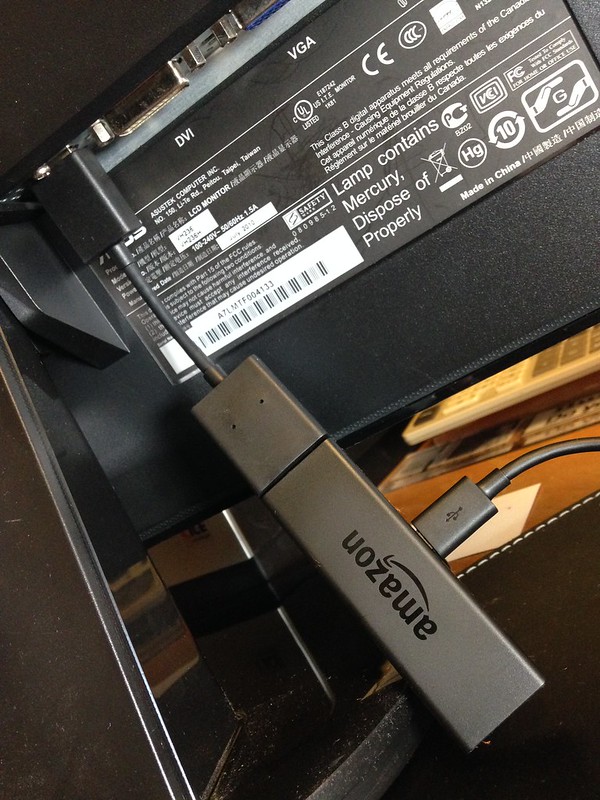
Amazon fireTV stick connected via HDMI EXTENDER CABLE TO Monitor HDMI port
HDMI1 and HDMI2
Once I had the firstTV stick set up, it was time to teach my mom how to use it to access Netflix.
My mom has Xfinity and uses that remote to do everything. But now that I introduced a new input, I had to go find the remote that came with the TV to show her how to switch between Xfinity and the Amazon fireTV smart stick, which from here on out I'll call Netflix.
So I found the remote and showed her the SOURCE button.
Note: Maybe she oculd have used the Xfinity remote to do this. I'll have to take a look the next time I visit. Makes sense.
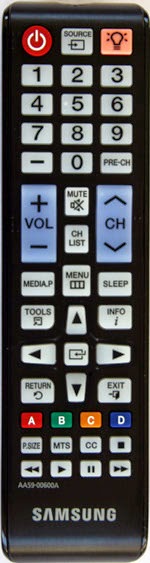
Me: Here mom. Use this remote to change between HDMI1 and HDMI2. HDMI1 is your TV, and HDMI2 is Netflix.
Mom: What does HDMI mean?
Me: I don't know, just press the SOURCE button.
Mom: What's HDMI1 and HDMI2?
Me: HDMI1 is your TV, and HDMI2 is Netflix.
AMAZON FIRETV STICK REMOTE
So we get Amazon fireTV stick display up on the tv and now need to navigate around.
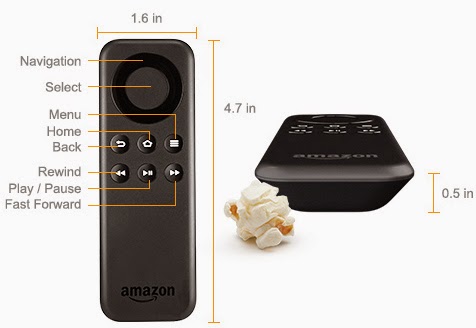
Me: Use the circle to go up, down, left, right, and the button inside the circle to select. Try moving around.
Mom: OK.
When my mom pressed down, it moved down two locations instead of one, and sometimes she pressed the select button instead of navigation. We figured out that the black circle was not differentiated enough in color to distinguish it from the black selection button.
We figured that out.
NETFLIX
Then we moved on to selecting Netflix.

Netflix on Amazon fireTV stick
Once there we looked at how to select and watch a show.
Back to TV
After that we practiced going back to TV.
[Times Passes and we visit again]
Mom: My TV isn't working. It says No Signal. I watched Netflix on my computer at my desk.
So I went over to the TV and saw that the SOURCE was set to TV. Ah ha!
Me: Mom, when you press the SOURCE button, you don't go to TV to get TV, you go to HDMI1 to get TV, which is Xfinity. When you press the SOURCE button, you need to bypass the TV option and only go to either HDMI1 or HDMI2. No TV.
That cleared things up!
Installing the fireTV stick was easy, teaching her the the difference between HDMI1, HDMI2, and TV was hard!
Amazon fireTV stick connected via HDMI EXTENDER CABLE TO Monitor HDMI port
HDMI1 and HDMI2
Once I had the firstTV stick set up, it was time to teach my mom how to use it to access Netflix.
My mom has Xfinity and uses that remote to do everything. But now that I introduced a new input, I had to go find the remote that came with the TV to show her how to switch between Xfinity and the Amazon fireTV smart stick, which from here on out I'll call Netflix.
So I found the remote and showed her the SOURCE button.
Note: Maybe she oculd have used the Xfinity remote to do this. I'll have to take a look the next time I visit. Makes sense.
Me: Here mom. Use this remote to change between HDMI1 and HDMI2. HDMI1 is your TV, and HDMI2 is Netflix.
Mom: What does HDMI mean?
Me: I don't know, just press the SOURCE button.
Mom: What's HDMI1 and HDMI2?
Me: HDMI1 is your TV, and HDMI2 is Netflix.
AMAZON FIRETV STICK REMOTE
So we get Amazon fireTV stick display up on the tv and now need to navigate around.
Me: Use the circle to go up, down, left, right, and the button inside the circle to select. Try moving around.
Mom: OK.
When my mom pressed down, it moved down two locations instead of one, and sometimes she pressed the select button instead of navigation. We figured out that the black circle was not differentiated enough in color to distinguish it from the black selection button.
We figured that out.
NETFLIX
Then we moved on to selecting Netflix.
Netflix on Amazon fireTV stick
Once there we looked at how to select and watch a show.
Back to TV
After that we practiced going back to TV.
[Times Passes and we visit again]
Mom: My TV isn't working. It says No Signal. I watched Netflix on my computer at my desk.
So I went over to the TV and saw that the SOURCE was set to TV. Ah ha!
Me: Mom, when you press the SOURCE button, you don't go to TV to get TV, you go to HDMI1 to get TV, which is Xfinity. When you press the SOURCE button, you need to bypass the TV option and only go to either HDMI1 or HDMI2. No TV.
That cleared things up!
Wednesday, December 03, 2014
Sunday, November 30, 2014

Friday, November 28, 2014
[Video] Jimmy Fallon & Rashida Jones Sing Holiday Parodies of the year's biggest songs.
Note:
YouTube embed works on Twitter, not on Facebook
Twitter:
.@JimmyFallon & Rashida Jones Sing Holiday Parodies of the year's biggest songs. http://t.co/oUzaH2pIPP via @YouTube @FallonTonight
— Steve Garfield (@stevegarfield) November 28, 2014
Facebook:

FACEBOOK GROUP: Fox 25 for Blacked-out Verizon FIOS Customers

Boston Globe writes, Fee dispute leaves FIOS customers in Mass. without Fox 25, but doesn't link to the Facebook group that they mention in the story.
Wellesley resident Cimarron Buser, who launched a Facebook page for people who lost service, urged them to complain to the Federal Communications Commission. He and others suggested ways to work around the blackout. One idea: Hook up a high-definition TV antenna and tune into the station’s broadcast for free.
“I’m not sure who is to blame for this, but clearly two large media companies . . . are fighting it out,” Buser said in an e-mail. “The consumer is the pawn in the game.”
Cimarron Buser
Subscribe to:
Posts (Atom)